From your address to the green box
Type your service address on starlink.com
In the tab that just opened, use the address box (Residential asks for it before anything else). Use the place where the dish will be installed. This site never asks for your address and never sees it.
Read the line Starlink shows about that address
For Bozeman we got
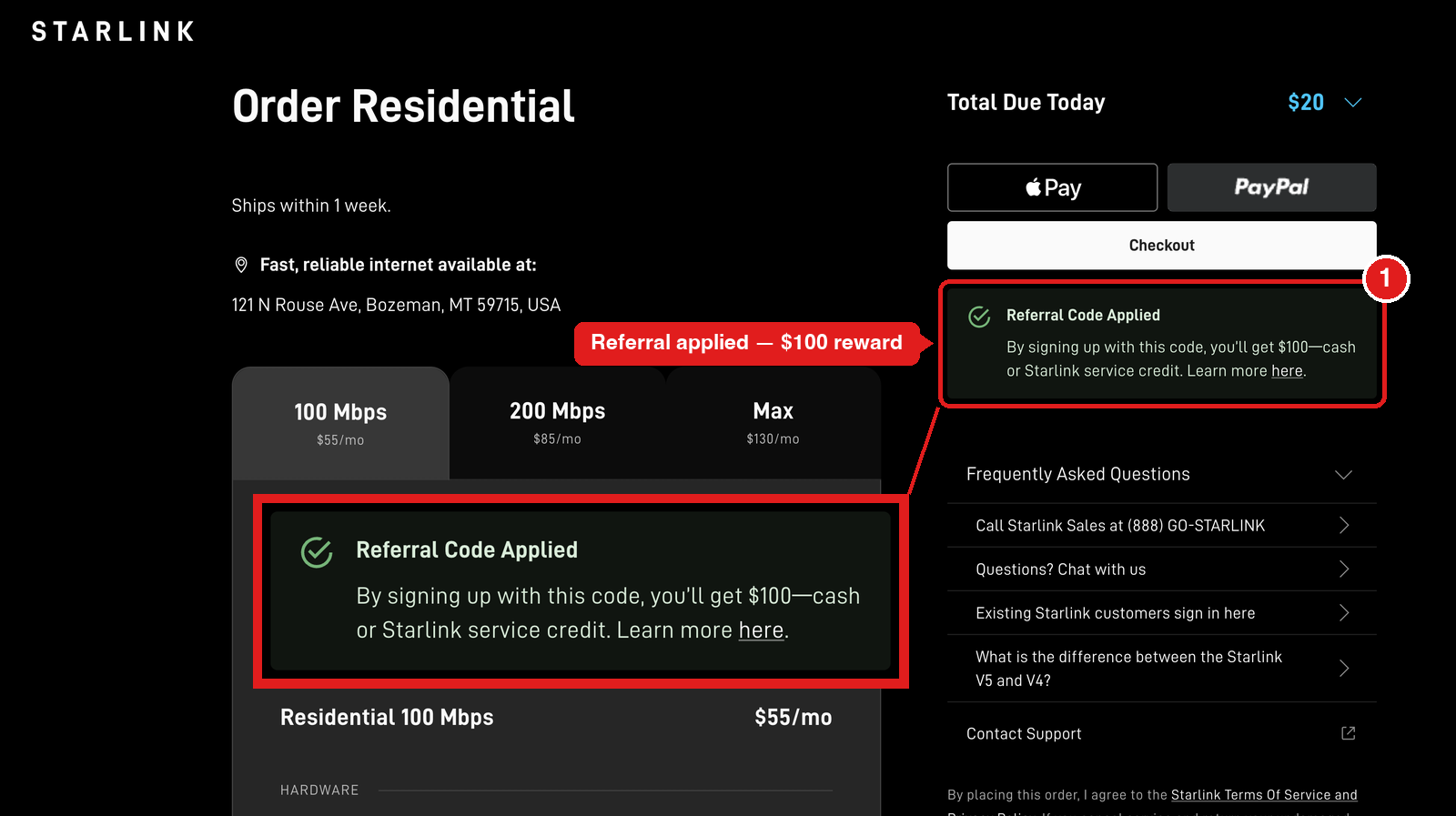
Fast, reliable internet available at
followed by the address. That wording means you can order now. Other wording changes what happens next; see the table below.Choose a plan and continue to the order page
Residential plans on Nov 16, 2026: 100 Mbps, 200 Mbps and Max. The order page lists the kit, the monthly price, any demand surcharge, and the Checkout button.
Look just below Checkout
A green panel reads:
Referral Code Applied — By signing up with this code, you’ll get $100—cash or Starlink service credit. Learn more here.
That’s the confirmation. No green panel means no referral on this order.
What Starlink says about your address, and what it means for the referral
Availability comes first. The referral only shows on an order page, so the message you get for your address decides whether you’ll see it today.
| What you see | What it means | For the referral |
|---|---|---|
| “…available at” your address | Service can be ordered there now. | Carry on to the order page. The green box should sit under Checkout. |
| A demand surcharge on the order page | A one-time fee where capacity is tight. Reports by county. | Separate from the referral. The $100 doesn’t cancel the fee; it comes later as credit. |
| “Sold out”, waitlist or a deposit | Residential capacity is full at that address. Starlink may take a deposit and contact you when it’s your turn. | Not tested by us. Check for the green box on whatever page you finally pay on, and ask Starlink support if it’s missing. |
| Not available, or no plan offered | Nothing to order at that address right now. What else to try. | No order page, so no referral to apply. Don’t enter a different address to get one. |
Don’t see the green box?
- Reopen the link here, in this browser. Use the button on this page, then go through address and plan again. The referral travels with the link and stays in the browser that opened it.
- Stay on one device and one app. Starting on your phone and finishing on a laptop, or moving from an in-app browser to Safari or Chrome, starts a fresh visit without the referral.
- Private windows and cookie blockers. A private window that was closed, or an extension that clears site data, can drop the referral before you reach checkout. Try a normal window.
- Typing starlink.com by hand loses it. So does a search result or a bookmark. Only a link carrying the referral works.
- Existing or previous Starlink customers don’t qualify, so the box may not appear on an account that has had service before.
- Store kits don’t qualify. A kit bought at a retailer or another website is activated without the referral. Order on starlink.com.
Referral link (the site owner’s own): Starlink may reward the owner if you order. Same price for you. US service addresses only.
The reward, in short
- Who gets it
- New US Starlink customers who order on starlink.com through a referral link.
- How much
- $100, as account credit by default; account credit, or cash where your account offers it.
- When
- After two months subscribed. Starlink’s terms apply it on the second monthly invoice.
- Who doesn’t
- Existing or previous customers, and kits bought in stores or from other sellers.
Starlink sets the amount and can change or end the program; your account shows what applies to you. Checked against Starlink’s referral terms on Nov 16, 2026. Why this site has a referral link at all, and the rules it keeps:How we make money. See also our terms of use.