Key takeaways
- The surcharge is set by service address and plan at the moment of checkout. The only legitimate levers are when you check out, which plan you pick, and whether you buy at all.
- Starlink refunds an eligible surcharge if you return the hardware within the 30-day return window.
- Broken dish? Starlink says a replacement through Support typically avoids the surcharge; a store kit creates a new service line that can trigger it.
- A false service address, a retail kit, promo codes and Standby do not avoid it. Several of them bring the fee back later.
- If you have fiber, cable or 5G home internet that works, a large surcharge is a good reason to keep it and check Starlink again later.
On this page
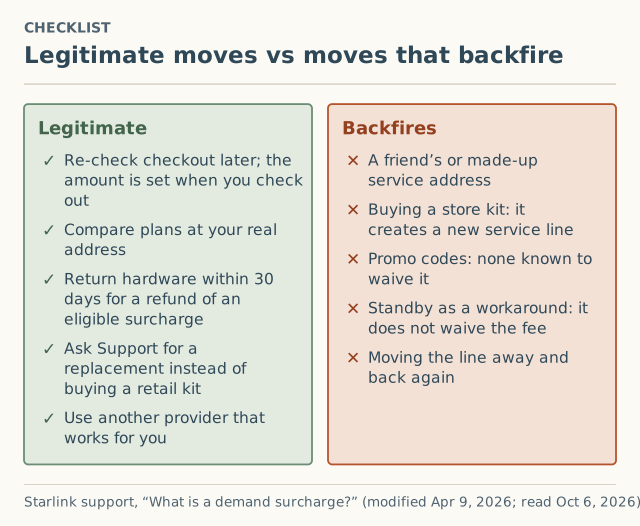
You can’t avoid a Starlink demand surcharge with a code or a trick, but you can legitimately lower what you pay in four ways: check out again at a later date, compare the plans you would really use at your real address, return the hardware within 30 days for a refund of an eligible surcharge, or choose another provider. If your dish broke, a replacement through Starlink Support typically avoids the fee where a store kit would not.
The reason the list is short: Starlink says the surcharge “is determined by: your service address; the service plan selected,” at the time you buy, activate, change plan or move. Every legitimate lever touches one of those inputs honestly. Every trick tries to fake one of them, and Starlink’s own rules make most tricks come back as a bill later.
The four legitimate levers
1. Check out at a different time
The surcharge is calculated when you check out, and Starlink says “pricing, availability, and surcharge amounts may change based on network capacity and regional demand.” If you have working internet today, the cheapest move is often to wait and check again.
Waiting is a bet, not a promise. The press record shows movement in both directions. On January 27, 2026, SatelliteInternet.com reported that Pacific Northwest surcharges of up to $1,000 had dropped to $500, and in the same piece that $1,500 was appearing in cities across Alaska (both unverified). Write down each quote with its date, so you know which way your address is moving. Our guide to checking before you order shows how.
2. Compare plans at your real address
Because the plan is one of the two inputs, a different plan at the same address can show a different line. Compare only plans you would actually keep. Starlink also says a later plan switch “may” bring a surcharge “depending on availability and demand in your area at the time of the change,” so picking an unsuitable plan now and switching later can cost you the fee anyway.
3. Use the 30-day return window if you change your mind
Starlink’s article: “If you are not satisfied with Starlink and return your hardware within the 30-day return window, any eligible demand surcharge will be refunded.” This doesn’t lower the fee if you keep the service. It does mean paying is reversible for a short time, which makes trying Starlink less of a gamble. Note your order date.
4. Replace hardware through Support, not a store
This one saves owners real money. Starlink: Support “can process a replacement under your existing service line. This does not create a new service line and typically avoids triggering a demand surcharge.” A kit bought at retail instead “creates a new service line,” and “you will be subject to the demand surcharge if your service address is in a high-demand area at the time of activation.” Starlink adds: “We strongly recommend reaching out to Support first for any replacement needs to avoid unnecessary charges.”
A fifth option isn’t a lever on the fee but is often the right answer: don’t buy Starlink at this address right now. Fiber, cable, 5G home internet and other satellite services don’t carry this fee.
What backfires, and why
Don't misstate your service address. It is the one "workaround" people keep suggesting, and it fails on Starlink's own terms: service "is only guaranteed at the service address listed on your account," and moving the line to your real high-demand address later can require a new surcharge.
| Trick | Why it fails | Starlink’s wording |
|---|---|---|
| A friend’s or made-up address | Service isn’t guaranteed where the dish really is, and the fee can return when you correct it | “Non-high-demand area → high-demand area: A new demand surcharge may be required” |
| A retail kit | It creates a new service line, evaluated at your address | “you will be subject to the demand surcharge if your service address is in a high-demand area” |
| Promo codes | None are known to waive it | The surcharge article names no waiver |
| Standby | Doesn’t waive a fee you never paid | “Standby Mode does not remove or waive demand surcharges” |
| Move away, then back | Moving back is its own trigger | “a demand surcharge may apply depending on network demand at that time” |
The address trick deserves its own explanation, because it fails in several ways at once. We cover it in why a friend’s address backfires.
Wait, pay or switch: a decision tree
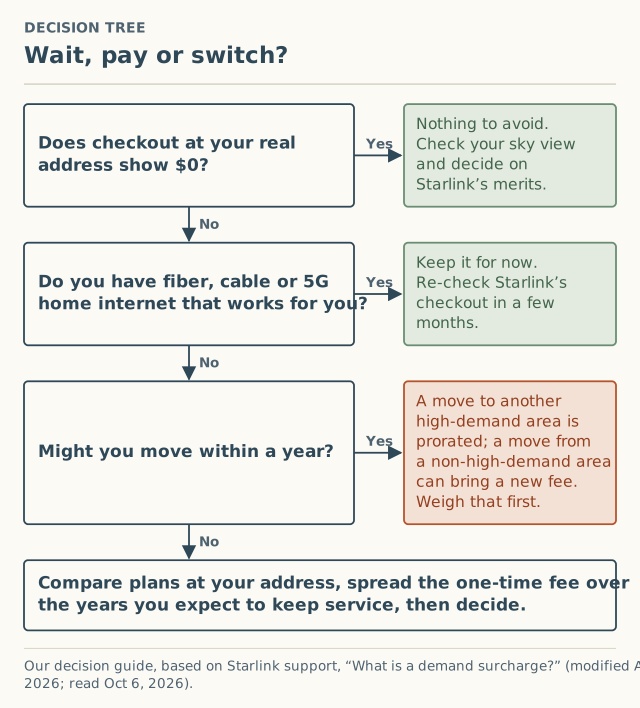
- Does checkout at your real address show $0? Then there is nothing to avoid. Decide on Starlink’s other merits, starting with a sky check in the app.
- Do you have fiber, cable or 5G home internet that works for you? Then keep it for now and check Starlink’s checkout again in a few months. A large one-time fee to replace something that works is rarely worth it.
- Might you move within a year? Starlink’s move rules matter here. A move between two high-demand areas is prorated, with what you paid credited. A move from a non-high-demand area into a high-demand one can bring a new fee. If your next home is likely to be in a busy area, weigh that now.
If none of those stop you, compare plans at your address and spread the fee over the years you expect to keep service.
Worked example: spreading a one-time fee
The numbers here are hypothetical. Starlink publishes no amounts, and your checkout may differ.
Say checkout shows a $500 surcharge. That amount appears in the press record: Broadband Breakfast reported $500 in Asheville in June 2025, and SatelliteInternet.com reported Pacific Northwest amounts dropping to $500 in January 2026 (both unverified).
| If you keep service for | The one-time fee works out to |
|---|---|
| 1 year | about $41.67 a month |
| 3 years | about $13.89 a month |
| 5 years | about $8.33 a month |
Two things change the picture:
- Returning it. Within 30 days of receiving the hardware, returning it refunds an eligible surcharge. After that, the money is spent.
- Moving. Moving out of a high-demand area doesn’t refund anything. Moving into another high-demand area credits what you paid toward the new address. Moving from a low-demand area into a high-demand one can add a new charge.
To see the surcharge inside a full first-year cost, use the year-1 cost calculator on our sister cost site. We don’t cover plan prices here.
Who shouldn’t order right now
- Your checkout shows a large surcharge and fiber, cable or 5G home internet works for you. Keep it and re-check later.
- Your address shows sold out. Buying a kit at a store doesn’t get around capacity. See what “sold out” means.
- You would need to misstate your service address to dodge the fee. Don’t.
- You haven’t checked your sky view. Starlink recommends the app’s “Check for Obstructions” before ordering in heavily obstructed spots. Fixing obstructions isn’t something we cover.
Three questions before you pay
- Would I still want Starlink if the fee were $0? If not, the fee isn’t the real issue.
- How long will I keep service at this address? The longer, the smaller the fee per month, and the less a later move matters.
- What does my current internet fail at? If the honest answer is “nothing important,” waiting costs you little.
What we don’t know
- Whether waiting pays off at your address. No public data shows how long fees last in an area. That’s one of the questions our crowd record is built to answer, once enough reports arrive. As of October 5, 2026 we had 0.
- Which plans tend to show lower fees. Starlink says plan matters but publishes nothing on how.
- Exact amounts. A July 16, 2026 GadgetReview article said “Tiers run $100, $250, $500, $750, and $1,500.” That matches the amounts in our press layer but is unverified, and Starlink hasn’t confirmed any tiers.
Common mistakes
- Paying because the fee “might go up.” It might also go down. Without a dated quote history, neither is knowable.
- Buying a retail kit to replace a broken dish. Call Support first.
- Assuming Standby protects you. It preserves eligibility you already had at an address; it doesn’t create it.
- Forgetting the return window. Note the date your hardware arrives.
What to do next
- Get a dated quote at your real address: check before you order.
- Understand why the fee appeared: what triggers a demand surcharge.
- Read the short version on our how-to-avoid page, and see whether anyone in your county has reported on the surcharge map.
- Whatever you saw, $0 included, add it to the record. It asks for your county, not your address.
Questions people ask
Is there a promo code that removes the Starlink demand surcharge?
Does buying Starlink at Best Buy or Home Depot avoid the surcharge?
Will the demand surcharge go down if I wait?
Can I use a different address to avoid the surcharge?
Does pausing with Standby avoid the demand surcharge?
Can I get the demand surcharge refunded?
Sources
- Starlink support: What is a demand surcharge? (modified Apr 9, 2026) (retrieved Oct 6, 2026)
- Starlink support: How do I change my service address? (modified Apr 9, 2026) (retrieved Oct 6, 2026)
- Starlink support: Service Plan Changes (modified Jul 10, 2026) (retrieved Oct 6, 2026)
- SatelliteInternet.com: Starlink congestion surcharge, Jan 27, 2026 (retrieved Oct 5, 2026)
- Broadband Breakfast: Starlink imposes $750 surcharge on new customers in major northwestern US cities, Jun 23, 2025 (retrieved Oct 5, 2026)
- GadgetReview: Starlink is billing customers $1,500 just to stay connected, Jul 16, 2026 (retrieved Oct 5, 2026)
Related guides
Surcharges
How to check for a Starlink surcharge before you order
The only place a Starlink demand surcharge shows is checkout. How to get a real quote at your address, what to write down, and where to stop before paying.
Owners
Why using a friend's address to dodge a Starlink fee backfires
Using a friend's address to avoid a Starlink demand surcharge risks your service and often brings the fee back. What Starlink's rules say, and better options.
Sold out
What “sold out” means on Starlink: capacity, not stock
Starlink “sold out” or “at capacity in your area” means Residential is full at that location, not a hardware shortage. What it means, US status now, what to do.