Key takeaways
- Starlink says service is only guaranteed at the service address on your account, and using equipment outside its assigned area may cause loss of connectivity or reduced performance.
- Residential service is tied to the registered address. Starlink's plan-change page says you must update it before using Residential somewhere else.
- Correcting the address later, from a non-high-demand area to a high-demand one, is a trigger: Starlink says a new surcharge may be required.
- US Residential pricing varies by region, and Regional Savings are removed when the address moves to an ineligible region.
- Honest options exist: quote your real address, compare plans, wait, return within 30 days, or use another provider.
On this page
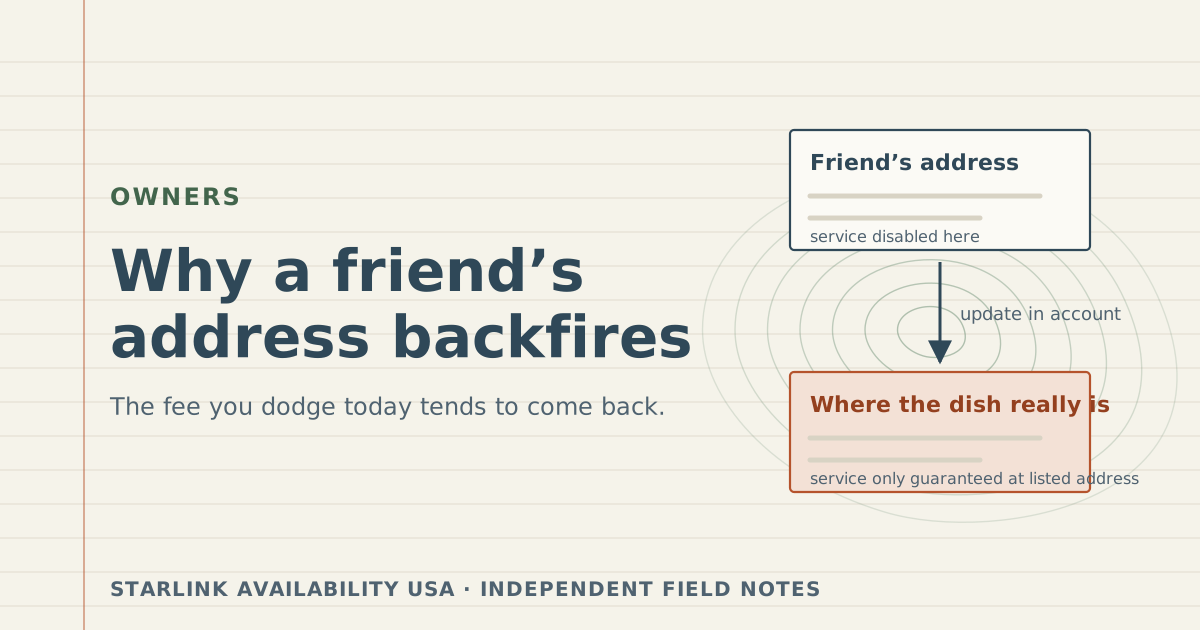
Using a friend’s address, or any address other than where the dish really sits, to dodge a Starlink demand surcharge backfires for three reasons Starlink states itself: service is only guaranteed at the address on your account, equipment used outside its assigned area may lose connectivity or slow down, and correcting the address later into a high-demand area can require the surcharge anyway. You risk the service you paid for and often end up paying the fee too.
This guide explains what the service address actually does, walks through each risk with Starlink’s wording, and lists the honest options that lower what you pay. It does not explain how to misstate an address, and we won’t.
What the service address does
When you order Starlink Residential, you give a service address: the place where the dish will be used. It isn’t your billing address or where the box ships. Several Starlink rules hang off it:
- The surcharge. Starlink says the demand surcharge “is determined by: your service address; the service plan selected.”
- Where service is guaranteed. “Starlink service is only guaranteed at the service address listed on your account.”
- Where Residential works. Starlink’s plan-change page: “Can I use my Residential service at a different address? Yes, but you must first update your service address on your account, as Residential service is tied to the registered service address.” Its Residential plans page says the same: Residential is tied to the registered address and does not support roaming.
- Regional pricing. “Pricing for US Residential service plans varies by region.”
So the address is not a form field you fill in once. It decides where your service is supposed to work and what it costs there.
The five risks, in Starlink’s words
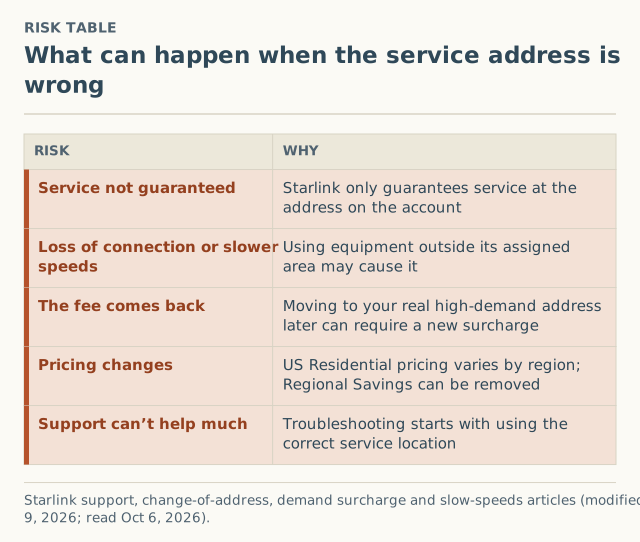
1. No guarantee where the dish really is
Starlink’s change-of-address article is explicit: service “is only guaranteed at the service address listed on your account.” If the dish is somewhere else, you have no promise of service where you are actually using it.
2. Lost connection or slower speeds
The same article: “Using your Starlink equipment outside of its assigned service area may result in loss of connectivity or reduced performance.” Network capacity is planned by area. A dish registered in one area and used in another is, from the network’s point of view, in the wrong place.
3. The fee comes back when you fix it
This is the part that defeats the purpose. Suppose the address on file is in an area with no surcharge, and the dish is really in a high-demand area. When you eventually update the address to the truth, Starlink’s surcharge rules treat it as a move:
“Non-high-demand area → high-demand area: A new demand surcharge may be required based on current network capacity.”
You end up paying the surcharge on the address change, at whatever the amount is then. Press coverage has described address-related charges: on July 2, 2026, MobileSyrup reported a $1,500 charge after an address verification and a $500 charge after a temporary relocation (both unverified). We don’t know the circumstances of those cases, but they show the fee attaches to address changes in practice, not just in the help text.
4. Pricing that doesn’t match where you are
“Pricing for US Residential service plans varies by region.” Starlink also says customers who “receive Regional Savings and update their service address to a region that is not eligible will have those savings removed and will be billed the full, original amount.” An address that doesn’t match reality means a price that doesn’t match reality, and correcting it can change your bill.
5. Troubleshooting starts with the address
Starlink’s slow-speeds article lists, as an early check: “Ensure your Starlink is being used in the correct service location listed on your account.” If you call about slow service from the wrong place, the first answer is already known.
Plainly: a service address that isn't where the dish is used goes against how Starlink says Residential works. We won't describe ways to do it.
Worked example: the “saving” that isn’t
The numbers are hypothetical; Starlink publishes no surcharge amounts.
A household’s real address shows a surcharge at checkout. A friend 30 miles away has no surcharge at theirs. Here is how registering at the friend’s address plays out:
| Moment | What happens | Cost of the shortcut |
|---|---|---|
| Order | Checkout shows no surcharge for the friend’s address | Looks like a saving |
| Daily use | Dish runs at the real address. Service isn’t guaranteed there; speed may suffer | Unreliable service |
| Evening slowdowns | Support’s first check is whether the dish is at the registered location | Little help |
| They update the address to the truth | Treated as a move from a non-high-demand to a high-demand area | A new surcharge “may be required,” at today’s amount |
| Regional pricing | If the friend’s region had Regional Savings and the real one doesn’t, savings end | Higher monthly bill |
Best case, they paid the fee late. Worst case, they paid a higher fee late and had poor service in between. Meanwhile, ordering honestly would have shown the real number up front, with a 30-day return window if they changed their mind.
Related situations that are fine
Not every address question is a dodge. These are legitimate:
- Buying for a family member at their home. The service address is where the dish will be used, so their address is correct. Any surcharge is set by their address and plan.
- Moving house. Update the service address to your new home. Our guide to changing your service address covers the steps and when a move can bring a fee.
- Needing service in more than one place. Starlink’s change-of-address article points people who need service outside their designated address to Roam plans. Whether that suits you is a plan question we don’t cover; it is the route Starlink names.
- A second home. That is a separate service line at that address, with its own evaluation, because surcharges are applied “per service line, not per account.”
Honest options that lower what you pay
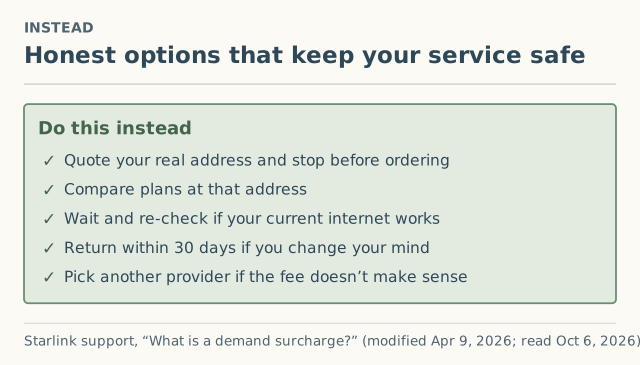
- Quote your real address and stop before ordering. Write down the date and amount (how).
- Compare the plans you would really use. The fee depends on plan as well as address.
- Wait and check again if your current internet works. Amounts “may change based on network capacity and regional demand.”
- Return within 30 days if you order and regret it. Starlink refunds an eligible surcharge when the hardware goes back in the window.
- Choose another provider if the fee doesn’t make sense for you. Fiber, cable, 5G home internet and other satellite services don’t carry it.
More detail on each in how to avoid a demand surcharge, legitimately.
If you’ve already registered the wrong address
It happens, sometimes by accident (a mailing address, a parent’s house during a move). The fix is to update the service address to where the dish really is. Expect the change to be evaluated like any move: if the real address is in a high-demand area and the old one wasn’t, a surcharge “may be required.” If the old one had Regional Savings and the real one isn’t eligible, they’re removed. Read the amount before you confirm. Starlink’s 30-day refund is tied to returning hardware, so it isn’t a way to undo an address-change surcharge. Our guide to changing your service address has the steps.
What we don’t know
- How Starlink checks where a dish is. Starlink doesn’t publish how it verifies location, and we don’t speculate on it. The risks above don’t depend on detection; they follow from how service and surcharges are defined.
- How often address-change surcharges happen. Press reports exist; crowd reports don’t yet. As of October 5, 2026 we had received 0 reports. Our form records address changes as their own event type, so this will become visible once counties reach 5 reports.
Common mistakes
- Thinking the surcharge follows the person. It follows the service address and plan, per service line.
- Thinking a one-time fee dodged is gone for good. Correcting the address is itself a trigger.
- Confusing shipping address with service address. Ship anywhere you like; the service address must be where the dish is used.
- Taking advice from forum posts that suggest it. None of them can promise service at the real location, because Starlink doesn’t.
What to do next
- Get your real number: check for a surcharge before ordering.
- If you’re an existing owner with an address question, read the owner surcharge page and what triggers a surcharge.
- If you saw a surcharge on an address change, report it. Choose “Changing my service address.” We ask for your county only.
Questions people ask
Can I register Starlink at a different address than where I use it?
What happens if Starlink finds out I'm not at my service address?
Will I have to pay the surcharge later if I move the dish to my real address?
Can I buy Starlink for a family member at their address?
Is there a legal way to lower the surcharge?
Sources
- Starlink support: How do I change my service address? (modified Apr 9, 2026) (retrieved Oct 6, 2026)
- Starlink support: What is a demand surcharge? (modified Apr 9, 2026) (retrieved Oct 6, 2026)
- Starlink support: Service Plan Changes (modified Jul 10, 2026) (retrieved Oct 6, 2026)
- Starlink support: What are the Residential plans? (modified Apr 8, 2026) (retrieved Oct 6, 2026)
- Starlink support: Slow Speeds - Outside/During Peak Hours (modified Apr 9, 2026) (retrieved Oct 6, 2026)
- MobileSyrup: Starlink $1,500 surcharge after address verification, Jul 2, 2026 (retrieved Oct 5, 2026)
Related guides
Owners
How to change your Starlink service address after a move
Step-by-step: change your Starlink service address on desktop or in the app, what to check first, why it can fail, and when a move brings a demand surcharge.
Surcharges
How to avoid a Starlink demand surcharge, legitimately
There's no code that waives a Starlink demand surcharge. The honest levers that can lower it, the tricks that backfire, and how to decide: wait, pay or switch.
Surcharges
What triggers a Starlink demand surcharge? One flowchart
The four events that trigger a Starlink demand surcharge, the one condition behind all of them, and the edge cases: moves, Standby, plan switches.