Key takeaways
- On desktop: Account, Subscriptions, your subscription, Edit in Service Location, new address, save. In the app: menu, Manage Subscription, Service Location, Set Service Address.
- Starlink says to allow 15–30 minutes for the change, and that service at the old address is disabled; returning may not be possible.
- Moving between two high-demand areas is prorated, moving to a non-high-demand area adds no surcharge, and moving into a high-demand area may require a new one.
- If the change fails, the new location may be at capacity or not yet active. Starlink points to its map and to Roam plans.
- Regional Savings are removed if the new address is in a region that isn't eligible.
On this page
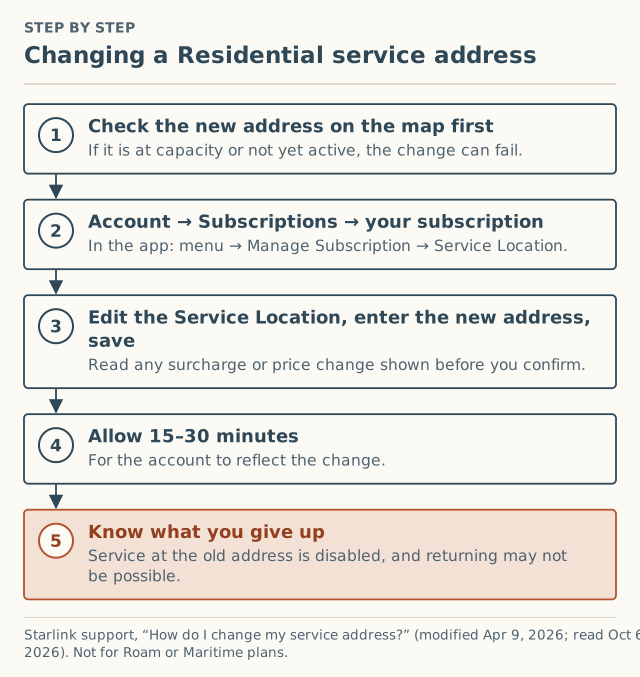
To change your Starlink service address, log in at starlink.com, open Subscriptions, select your subscription, click Edit in the Service Location section, enter the new address and save. In the Starlink app it’s the menu, then Manage Subscription, then Service Location. Starlink says to allow 15–30 minutes for the change to show, and warns that service at the old address is switched off.
Before you do it, check two things: whether the new address has capacity (the change can fail if it doesn’t), and whether the move goes into a high-demand area, because Starlink’s surcharge rules treat a move like a new checkout event in some cases. Both are covered below. These steps are for Residential; Starlink says they don’t apply to Roam or Maritime plans.
Before you move: a five-minute checklist
- Look up the new address on Starlink’s availability map. Starlink’s article says an unsuccessful change may mean “the requested location may be at capacity or not yet active for service.”
- Know which surcharge case you’re in (table below). You can’t see the amount until you’re in the change flow, but you can know whether one is possible.
- Check for Regional Savings on your current bill. If you have them and the new region isn’t eligible, Starlink says they “will be removed” and you’ll be “billed the full, original amount.”
- Decide when to switch. Starlink: “Updating your service address will disable service at your previous location, and returning to that address may not be possible.” Don’t change it while you still need service at the old home.
- Stay in the same country. “Your new service address must be located within the same country used during your initial account signup.”
Step by step: changing the address
On a computer
Starlink’s steps, verbatim in order:
- Log in to your Starlink account.
- Navigate to Subscriptions and select the applicable subscription.
- Click Edit within the Service Location section.
- Enter your new service address.
- Save your changes.
In the Starlink app
- Open the Starlink app.
- Select the menu (“hamburger”) icon in the top left corner.
- Select Manage Subscription.
- Tap Service Location.
- Use your current location or enter the new address manually.
- Tap Set Service Address.
If you see a surcharge or a price change in the flow, read it before confirming. Starlink says to allow “up to 15–30 minutes for your account to reflect changes.”
Several kits? Starlink says customers with multiple kits "may update the service address for one kit without impacting the service addresses of their other kits." Surcharges work the same way: they're applied per service line, so moving one line doesn't affect the others.
Will the move cost a surcharge?
Starlink’s demand surcharge article lists “changing service address to a high-demand area” and “moving between service addresses” as triggers, and spells out the cases:
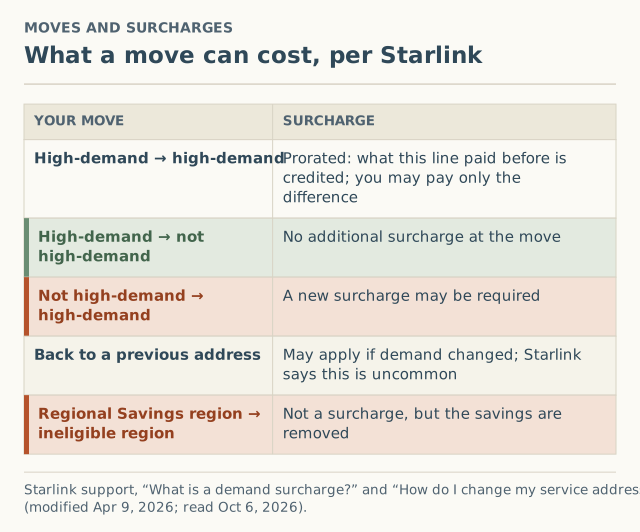
| Your move | What Starlink says |
|---|---|
| High-demand to high-demand | “The demand surcharge will be prorated. Any previously paid surcharge for that specific service line will be credited toward the new location’s surcharge, and you may only pay the difference if applicable.” |
| High-demand to not high-demand | “No additional surcharge will apply at the time of the move.” |
| Not high-demand to high-demand | “A new demand surcharge may be required based on current network capacity.” |
| Back to a previous address | “A demand surcharge may apply depending on network demand at that time. This is uncommon but may occur if availability has changed.” |
RV Mobile Internet reported these move rules as a policy change on April 9, 2026. Press coverage since then has described address-related charges: MobileSyrup reported on July 2, 2026 a $1,500 charge after an address verification and a $500 charge after a temporary relocation. Both are unverified, and we don’t know the details of either case.
Worked examples
Starlink publishes no amounts, so the figures here are hypothetical placeholders.
Moving from one busy area to another. A household paid a surcharge of X when they first ordered. They move to a city where a new customer would pay Y. If Y is larger than X, Starlink says they “may only pay the difference,” Y minus X. If Y is smaller, nothing in the article suggests a refund of the difference; it simply says the earlier payment is credited.
Moving from a quiet area to a busy one. A household paid no surcharge at their rural address and moves to a high-demand suburb. This is the case where “a new demand surcharge may be required.” They should expect the move flow to show whatever a new customer at that address would see.
Moving from a busy area to a quiet one. No additional surcharge at the time of the move. The earlier surcharge isn’t refunded, and if they later move back into a high-demand area, that’s a new event.
If the change fails
Starlink names two causes:
- Capacity or activation. “The requested location may be at capacity or not yet active for service.” Check the map. If you need service outside your designated service address, Starlink suggests “you may consider switching to a Roam plan.” Plan choice is a separate decision; we only note that it’s the route Starlink names. Its activation article also says that once you’re on Roam in a capacity-limited area, you can’t switch back to Standard or Priority “until your area has available capacity.”
- An outdated app. “Please ensure you are using the latest version of the Starlink app, or attempt the update through your account at starlink.com using a web browser.”
If the new address is sold out, see what “sold out” means and how the waitlist works.
Edge cases
- Moving abroad. Not a service-address change. Starlink says permanent relocation to another country follows its transfer requirements.
- Using Residential somewhere temporarily. Starlink’s plan-change page says Residential is “tied to the registered service address,” and that you must update the address before using it elsewhere. Using equipment outside its assigned area “may result in loss of connectivity or reduced performance.”
- Paused service. Standby preserves eligibility at your current service address. A move is still evaluated as a move. The reactivation checklist covers resuming.
- Registering somewhere other than where the dish is. Don’t. It fails on Starlink’s own terms and the fee tends to return; see why a friend’s address backfires.
A moving-week timeline
| When | What to do |
|---|---|
| Two to four weeks before | Check the new address on the map. Note whether you have Regional Savings on your current bill. Run the app’s obstruction check at the new place if you can visit |
| The week before | Decide the day service should switch. Remember the old address stops working once you change it |
| Moving day | Set up the dish at the new home, then change the service location in the app or on starlink.com |
| Right after | Read any surcharge or price change before confirming. Allow 15–30 minutes for the account to update |
| The first evening | If speeds seem low, check the app for alerts and obstructions first; peak hours are typically 6–11 pm local |
| Later | If a surcharge appeared, or didn’t, report it as “Changing my service address” |
What we don’t know
- How large “high-demand areas” are, or where their edges fall. Starlink doesn’t publish boundaries, so you can’t tell in advance whether a move across town crosses one.
- How often moves bring a fee in practice. That’s what our crowd record will show by county once there are enough reports. As of October 5, 2026 we had received 0. The form records address changes as their own event type.
Common mistakes
- Changing the address before you’ve moved out. Service at the old address stops.
- Expecting to switch back easily. “Returning to that address may not be possible.”
- Forgetting Regional Savings. Moving to an ineligible region ends them.
- Assuming the fee was “used up” at your old home. Only a move between two high-demand areas carries credit.
What to do next
- Check the new address on the map, then make the change when you’re ready to stop service at the old one.
- If the flow shows a surcharge, read what triggers it and the owner surcharge page before confirming.
- Whatever it showed, $0 included, add it to the record as “Changing my service address.” We ask for your county, never the address.
Questions people ask
How do I change my Starlink service address?
How long does a Starlink address change take?
Does changing my Starlink address cost money?
Why won't Starlink let me change my address?
Can I move my Starlink to another country?
Can I move back to my old address later?
Sources
- Starlink support: How do I change my service address? (modified Apr 9, 2026) (retrieved Oct 6, 2026)
- Starlink support: What is a demand surcharge? (modified Apr 9, 2026) (retrieved Oct 6, 2026)
- Starlink support: Service Plan Changes (modified Jul 10, 2026) (retrieved Oct 6, 2026)
- Starlink support: How do I activate my Starlink? (modified Apr 9, 2026) (retrieved Oct 6, 2026)
- Starlink availability map (retrieved Oct 6, 2026)
- RV Mobile Internet: Starlink changes demand surcharge policy for Standby Mode and service address moves, Apr 9, 2026 (retrieved Oct 5, 2026)
- MobileSyrup: Starlink $1,500 surcharge after address verification, Jul 2, 2026 (retrieved Oct 5, 2026)
Related guides
Owners
Why using a friend's address to dodge a Starlink fee backfires
Using a friend's address to avoid a Starlink demand surcharge risks your service and often brings the fee back. What Starlink's rules say, and better options.
Owners
Starlink reactivation quote higher than expected: a calm checklist
Resuming Starlink and the quote shows a demand surcharge? Six checks before you confirm, the two Starlink help pages that disagree, and when to open a ticket.
Surcharges
What triggers a Starlink demand surcharge? One flowchart
The four events that trigger a Starlink demand surcharge, the one condition behind all of them, and the edge cases: moves, Standby, plan switches.