Key takeaways
- Starlink says the surcharge applies only when you buy new service, activate a new plan in a high-demand area, change your service address to a high-demand area, or move between service addresses.
- Every trigger depends on the same two inputs: your service address and the plan you pick. It is charged per service line, not per account.
- Moves between two high-demand areas are prorated: what that line already paid is credited. Moving to a non-high-demand area adds nothing.
- Starlink's own help pages disagree about resuming from Standby (both modified Apr 9, 2026). The surcharge article says one may apply if that line never paid at that address.
- Starlink publishes no amounts and no map. Press reports since September 2024 quote $100 to $1,500, all unverified.
On this page
A Starlink demand surcharge is triggered by one of four events: buying new service, activating a new service plan, changing your service address to a high-demand area, or moving between service addresses. In every case the fee only appears if the service address is in a high-demand area at that moment, for the plan you picked. If neither is true, there is no surcharge, and if the same service line already paid for that location, Starlink says you usually won’t pay again.
That is the whole rule as Starlink writes it in its help article “What is a demand surcharge?” (modified April 9, 2026, re-read October 6, 2026). The rest of this guide walks through the flowchart, each trigger, the edge cases that catch existing owners, and what nobody outside Starlink knows yet.
The flowchart: three questions decide it
Starlink’s article boils down to three yes-or-no questions. Ask them in order.
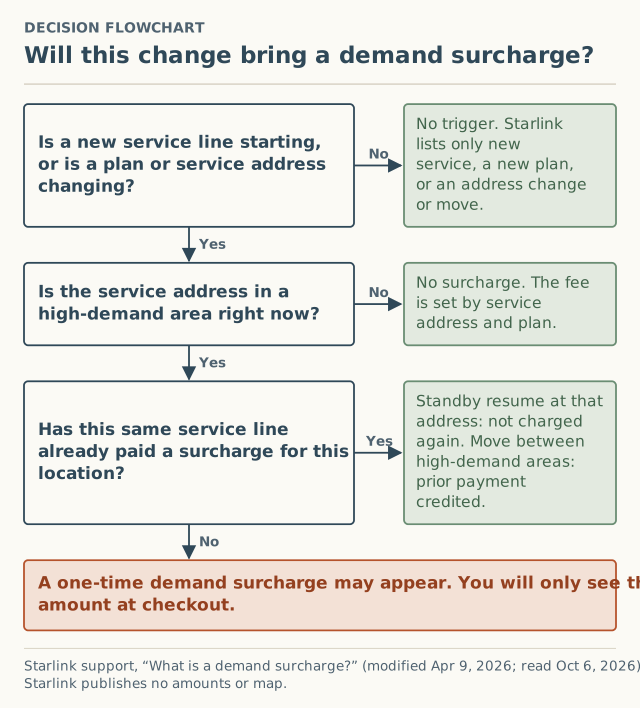
- Is something starting or changing? Starlink says the charge “only applies when” you purchase new service, activate a new service plan in a high-demand area, change your service address to a high-demand area, or move between service addresses. Ongoing monthly service is not on that list.
- Is the service address in a high-demand area right now? The article says the surcharge “is determined by: your service address; the service plan selected.” Same address, different plan, possibly different answer.
- Has this service line already paid for this location? If yes, a Standby resume at the same address is not charged again, and a move between high-demand areas is prorated. If no, the fee may apply.
The four triggers, one by one
1. A new order (a new service line)
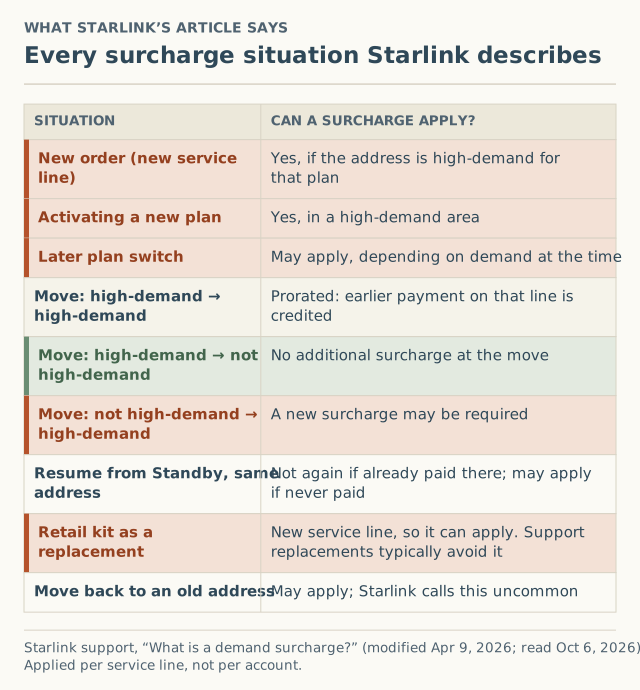
This is the case most people meet. You enter your address, pick a plan, and a “demand surcharge” line appears in the order summary. Starlink applies the fee “per service line, not per account,” so a second kit on the same account is evaluated on its own address and plan. It does not ride on the first kit’s history.
2. Activating a new plan in a high-demand area
Starlink lists “activating a new service plan in a high-demand area” as its own trigger, and separately says: “If you switch service plans later, a demand surcharge may be applied depending on availability and demand in your area at the time of the change.” Its Service Plan Changes page (modified July 10, 2026) adds that Residential plan changes are “subject to availability in your area.”
In plain terms: switching plans is a checkout event, and checkout events can carry the fee.
3. Changing the service address to a high-demand area
Residential service is tied to the registered service address. When you change it, Starlink evaluates the new address. The article spells out three cases:
| Your move | What Starlink says |
|---|---|
| High-demand area to another high-demand area | Prorated. What this line already paid is credited; “you may only pay the difference if applicable.” |
| High-demand area to a non-high-demand area | “No additional surcharge will apply at the time of the move.” |
| Non-high-demand area to a high-demand area | “A new demand surcharge may be required based on current network capacity.” |
4. Moving between service addresses (including moving back)
Starlink lists “moving between service addresses” as a trigger in its own right and adds a case people don’t expect: moving back to a previous address “may” bring a surcharge “depending on network demand at that time.” Starlink calls this “uncommon but may occur if availability has changed.” Having lived somewhere before is not a pass.
Edge cases that catch existing owners
Resuming from Standby
This is where Starlink’s own pages disagree. The demand surcharge article says: “Standby Mode does not remove or waive demand surcharges. It only preserves your previous eligibility for your service address.” It goes on: if you already paid for that location, you can resume “without paying the surcharge again”; if you never paid for that location, “one may apply when you resume high-speed service.”
The pausing article, modified the same day, still carries an FAQ that reads: “No, you will not have to pay a demand surcharge if you pause your service with Standby Mode and then resume later.”
Both were still worded that way when we re-read them on October 6, 2026. RV Mobile Internet reported the policy change on April 9, 2026. If you are about to resume, our reactivation checklist covers what to check before you confirm. Whether pausing is right for you is a separate decision we don’t cover; the owner surcharge page collects what is known about the fee side.
Replacing a broken dish with a store kit
Starlink is direct about this one. A replacement processed by Support stays on your existing service line and “typically avoids triggering a demand surcharge.” A kit bought at a store “creates a new service line,” and “you will be subject to the demand surcharge if your service address is in a high-demand area at the time of activation.” Starlink recommends contacting Support first. More on retail in does buying at a store avoid it?
Two lines on one account
Because the fee is per service line, moving one kit “does not affect surcharges tied to other service lines.” A household with a home dish and a second kit is really two separate cases.
Returning the hardware
Starlink says: “If you are not satisfied with Starlink and return your hardware within the 30-day return window, any eligible demand surcharge will be refunded.” It is the only refund path the article names. Starlink also says that if you believe you were “incorrectly charged,” you should “create a ticket for further review.”
Worked example: one address, three different moments
The amounts below are made up to show the logic. Starlink publishes no amounts.
- March. A household orders Residential at a high-demand address. Checkout shows a surcharge, call it X. They pay it. That service line has now “paid for this location.”
- August. They pause with Standby and resume in November at the same address. Under the surcharge article, they should not pay X again, because the line already paid there. Under the pausing FAQ, no surcharge applies either. Both pages agree here.
- Next spring. They move across the state to an address that is also high-demand, where checkout would charge a new customer Y. Starlink says the move is prorated: X is credited, and they “may only pay the difference” if Y is bigger than X.
Now change one fact. Suppose they had first ordered at a low-demand address and paid nothing, then moved into the high-demand area. That is the “non-high-demand to high-demand” case, and “a new demand surcharge may be required.” Same people, same dish, different history, different answer.
What the fee has been called, and what the press reported
Early coverage used “congestion charge.” Starlink’s help center uses “demand surcharge.” Searching both terms finds the same fee.
There is no public list of amounts from Starlink. What exists is a press layer: news articles that quoted an amount for a city or state on a date. We keep every one we can source, with its link, as a separate layer marked unverified.
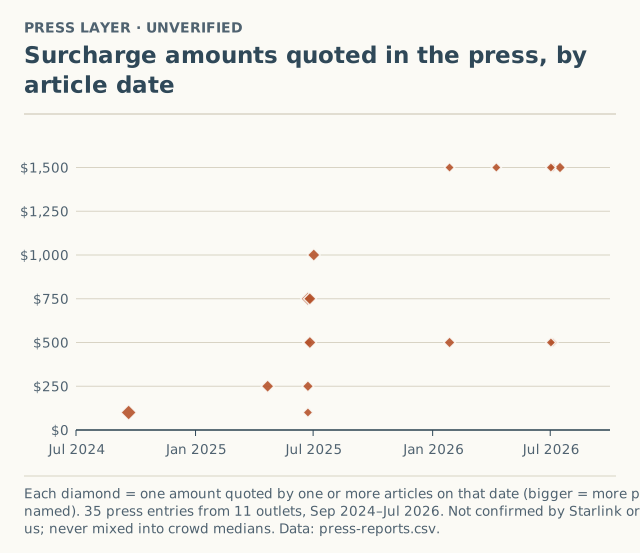
The main points on that record, all unverified:
- Sep 20, 2024: Blandin on Broadband, citing PCMag, described a $100 congestion charge in states including Texas, Florida, Kansas, Ohio and Virginia.
- Apr 22, 2025: APH Networks reported the charge rising “from $100 to $250” in Sacramento, San Diego and Phoenix.
- Jun 23, 2025: Broadband Breakfast reported $750 for new customers in Portland, Seattle, Spokane and Coeur d’Alene, $500 in Asheville, $250 in Anchorage and Phoenix, and $100 in Sacramento.
- Jan 27, 2026: SatelliteInternet.com reported $1,500 in cities across Alaska and said Pacific Northwest surcharges of up to $1,000 had dropped to $500.
- Jul 2, 2026: MobileSyrup described a $1,500 charge after an address verification and a $500 charge after a temporary relocation, both address-change cases.
The full list, with every outlet and link, is on the surcharge history page.
What we don’t know
- How “high-demand” is decided. Starlink says it depends on “network capacity and regional demand.” It does not publish the boundaries, the size of an area, or how often they change.
- The amounts. Starlink’s article has no dollar figures. Every number on this page is from the press, unverified.
- Whether two neighbors see the same fee. The fee follows the service address and plan, but no public source says how fine-grained that is.
- What happens on Standby resume in practice. Two Starlink pages say different things. Press outlets have reported $1,500 resumes; we have no crowd reports yet to show how common that is.
That last gap is what our crowd layer is for. As of October 5, 2026, we had received 0 reports, so no county has a published number yet. A county shows a surcharge range only after 5 accepted reports in 6 months (how the threshold works).
Common mistakes
- Assuming the map shows the fee. It doesn’t. The amount only shows at checkout.
- Assuming rural means no fee. Press reports named smaller places as well as big metros. Demand is about capacity at your address, not population.
- Assuming a retail kit skips it. Starlink says a retail kit activated as a new line is subject to the surcharge in a high-demand area.
- Assuming Standby keeps you safe. Read the quote on resume. The two help pages disagree.
- Using a different address to get a lower number. It breaks the point of a service address and can backfire on a later move. See why a friend’s address backfires.
What to do next
- If you’re buying, get the real number first: check for a surcharge before you order.
- If you’re an owner about to move, read how to change your service address and the move rules above.
- If checkout showed you a surcharge, a $0 line or a sold-out message, add it to the record. We ask for your county, never your address.
- For the dated source list behind every statement here, see what triggers a surcharge.
Questions people ask
What is the Starlink demand surcharge?
Is the Starlink congestion charge the same as the demand surcharge?
Do you pay the demand surcharge every month?
Does changing plans trigger a demand surcharge?
Will I pay a surcharge again if I resume from Standby?
Can I see the surcharge for my address before ordering?
Sources
- Starlink support: What is a demand surcharge? (modified Apr 9, 2026) (retrieved Oct 6, 2026)
- Starlink support: How does pausing service work? (modified Apr 9, 2026) (retrieved Oct 6, 2026)
- Starlink support: Service Plan Changes (modified Jul 10, 2026) (retrieved Oct 6, 2026)
- Blandin on Broadband (citing PCMag): Starlink charges $100 congestion charge, Sep 20, 2024 (retrieved Oct 5, 2026)
- APH Networks: SpaceX increases Starlink congestion charge in several US cities, Apr 22, 2025 (retrieved Oct 5, 2026)
- Broadband Breakfast: Starlink imposes $750 surcharge on new customers in major northwestern US cities, Jun 23, 2025 (retrieved Oct 5, 2026)
- SatelliteInternet.com: Starlink congestion surcharge, Jan 27, 2026 (retrieved Oct 5, 2026)
- RV Mobile Internet: Starlink changes demand surcharge policy for Standby Mode and service address moves, Apr 9, 2026 (retrieved Oct 5, 2026)
- MobileSyrup: Starlink $1,500 surcharge after address verification, Jul 2, 2026 (retrieved Oct 5, 2026)
Related guides
Surcharges
How to check for a Starlink surcharge before you order
The only place a Starlink demand surcharge shows is checkout. How to get a real quote at your address, what to write down, and where to stop before paying.
Surcharges
Is the Starlink demand surcharge one-time, or can it come back?
Starlink's demand surcharge is one-time, never monthly, but a new service line, a move, a plan switch or a retail replacement kit can bring it back.
Owners
How to change your Starlink service address after a move
Step-by-step: change your Starlink service address on desktop or in the app, what to check first, why it can fail, and when a move brings a demand surcharge.