Key takeaways
- Starlink sets the surcharge by service address and plan, so the only real quote is checkout with your real address and the plan you would actually buy.
- The availability map tells you whether service is offered or sold out. It does not show a surcharge.
- Read the order summary line by line, then stop before you place the order. Write down the date, plan, kit, amount and county, not your street address.
- If you order and change your mind, Starlink says an eligible surcharge is refunded when the hardware goes back within the 30-day return window.
- Neighbors, press reports and county data are context. None of them is your quote.
On this page
To check for a Starlink demand surcharge before you order, start an order on starlink.com with your real service address and the plan you would actually buy, then read the order summary before you place the order. That summary is the only place the fee appears. Starlink’s map doesn’t show it, and Starlink publishes no list of amounts.
Starlink’s help article says the surcharge “is determined by: your service address; the service plan selected.” So any quote that uses a different address or a different plan is a quote for someone else. The steps below get you a real number without committing, and a written record you can compare later.
Step by step: get the real number, then stop
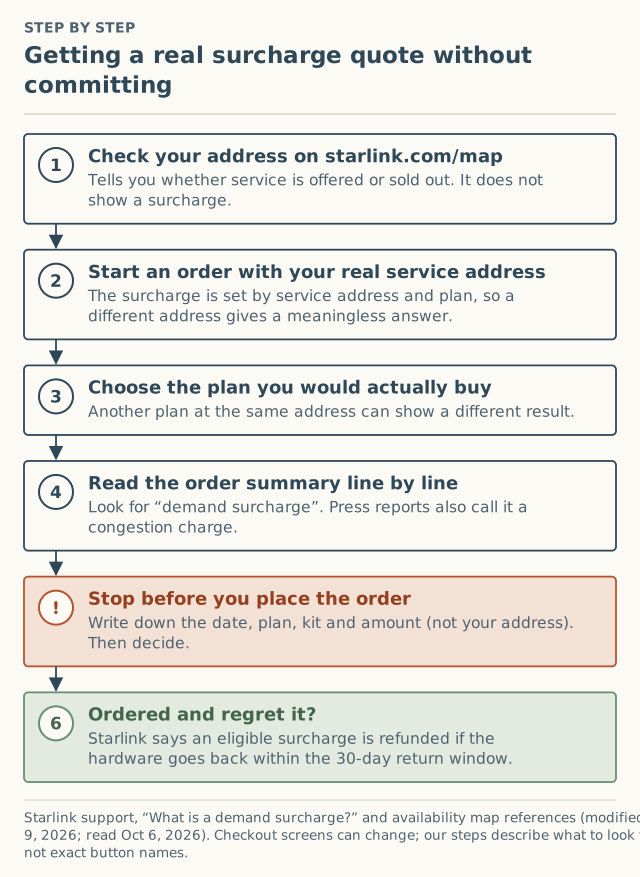
- Check the address on the map first. Go to Starlink’s availability map and type the address where the dish will live. If the area is sold out, checkout will steer you to a deposit instead of an order (see what “sold out” means). The map won’t show a surcharge either way.
- Start an order with your real service address. The service address is where the dish will be used, not your billing or mailing address. Starlink says service “is only guaranteed at the service address listed on your account,” so it is also the only address whose quote means anything.
- Pick the plan you would actually buy. The fee depends on the plan as well as the address. If you are torn between two Residential plans, look at both, one after the other.
- Read the order summary line by line. Look for a line named “demand surcharge.” News coverage in 2024 and 2025 often called it a congestion charge, so either name may come up in search results. It is a one-time line, separate from the kit and the monthly service.
- Stop before you place the order. Write down what you saw (the next section lists what). Placing the order is the step that commits you, so the decision happens here, with the number in front of you.
- Know the return window. If you go ahead and later regret it, Starlink says: “If you are not satisfied with Starlink and return your hardware within the 30-day return window, any eligible demand surcharge will be refunded.”
Button names change. Checkout screens are redesigned from time to time. These steps describe what to look for, not exact button labels. If the summary looks different, look for any line that is not the kit, shipping, tax or the monthly plan.
What to write down (and what not to keep)
A quote you can’t remember is worth nothing a month later, when you’re trying to tell whether the fee went up or down. Write a short note with these six things:
| Write down | Why it matters | Example |
|---|---|---|
| Date | Starlink says amounts “may change based on network capacity and regional demand” | Oct 6, 2026 |
| Plan you chose | The fee depends on plan | Residential (which tier) |
| Kit | Rental, bought, or Mini can be a separate question | Bought kit |
| Surcharge line | The number, or “none shown” | $0, or the amount |
| County | Lets you compare with others near you without exposing your home | Your county |
| What you did next | Ordered, waited, or chose another provider | Waited |
What not to keep in a note you might share: your street address, a screenshot of the checkout page (it usually shows the address), or your account details. A county is enough for comparison. That is why our report form asks for the county and never the address (why).
Comparing plans and dates, honestly
There are two legitimate ways to see a different number: a different plan at your real address, or a different day.
Different plans. Starlink says the surcharge is set by address and plan. If you would be equally happy on either of two plans, compare both at checkout. Don’t pick a plan you don’t want just to see a lower line; a later plan switch “may” bring a surcharge, depending on demand at the time.
Different days. The capacity check runs when you check out. If you have internet that works, checking again in a few weeks or months is a fair way to see whether the number moved. Press coverage has recorded moves in both directions: SatelliteInternet.com reported on January 27, 2026 that areas of the Pacific Northwest with surcharges of up to $1,000 had seen them drop to $500, while the same article reported $1,500 appearing in cities across Alaska. Both are unverified press-layer reports.
What counts as a quote, and what doesn’t
People often try to get the number some other way first. Here is how each source compares.
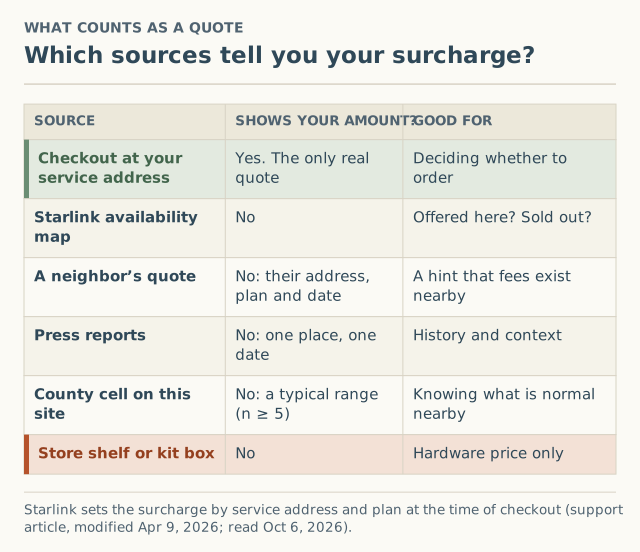
- A neighbor’s quote is for their address, their plan and their date. It tells you fees exist nearby, nothing more.
- Press reports quote one amount for one city or state on one date. They are history, not a forecast.
- County cells on this site will show the range readers in your county saw, but only once a county has at least 5 accepted reports in the last 6 months. As of October 5, 2026 no county had reached that, so you will see “not enough reports yet” (why that’s an honest answer).
- A kit on a store shelf shows a hardware price. Starlink’s sold-out article tells retail buyers to “enter your desired service address on our order page to ensure availability,” and a retail kit activated as a new service line can still carry the surcharge.
Worked example: reading one checkout
Here is how the decision looks with numbers. The surcharge figure comes from a press report and is used only as an example; your checkout may show something else entirely.
On June 23, 2025, Broadband Breakfast reported that new customers in Asheville, North Carolina, faced a $500 surcharge (unverified). Suppose a reader near there checks out today:
- The map shows service is offered. No sold-out notice.
- Checkout with the real address and Residential shows the kit, the monthly plan, shipping, tax, and one extra line. Say it reads $500.
- They stop. The note reads: “Oct 6, 2026 · Residential · bought kit · surcharge $500 · Buncombe County · waited.”
- They have cable that works, so they decide to check again later instead of paying today.
- A few months on, they repeat the same steps with the same plan. Whatever the new number is, they now have a dated pair of quotes to compare, which is more than most buyers ever have.
If the second check showed $0, that would be their answer. If it showed more, they would know waiting didn’t help, and could weigh paying against keeping cable. For that trade-off, the year-1 cost calculator on our sister cost site lets you add the surcharge to a full first-year estimate.
Edge cases
- Checkout offers a deposit, not an order. That means Residential is at capacity at that address. There is no surcharge to read yet because there’s no order to place. See how the waitlist works.
- Only Roam is offered. Starlink’s activation article says Standard and Priority plans “cannot be activated in capacity-limited areas,” and that you can’t switch from Roam to Standard or Priority “until your area has available capacity.”
- You already own a kit. Activating it on a new service line is a new-service event, so the same check applies. Starlink says a replacement handled through Support stays on your existing line and “typically avoids” the surcharge.
- You’re adding a second kit. The fee is applied “per service line, not per account,” so the second kit gets its own evaluation.
- You’re about to move. Check the new address the same way before you move the service. Our guide to changing your service address explains when a move can bring a fee.
Common mistakes
- Using a different address to “test” the price. The result is for that address, and ordering on it breaks the point of a service address. See why a friend’s address backfires.
- Taking a screenshot to remember the number. It usually captures your address. A one-line note is safer and just as useful.
- Assuming the number is permanent. It’s a quote for one moment. Date it.
- Skipping the sky check. Starlink recommends running the app’s “Check for Obstructions” before ordering if your site is heavily obstructed. A $0 surcharge doesn’t help if trees block the view.
- Treating the 30-day window as a free trial for the fee. The refund applies when you return the hardware. Keep your order date.
What to do next
- Do the check today if you’re seriously considering Starlink. It takes a few minutes and costs nothing until you place the order.
- If the line shows a fee, read how to avoid a demand surcharge, legitimately for the honest options, and what triggers it to understand why it appeared.
- Add what you saw, $0 included, to the county record. Reports of $0 matter as much as large fees, because people who saw a surprise are more likely to report. The form takes about two minutes and asks for your county only.
Questions people ask
Does the Starlink availability map show the demand surcharge?
Can I see the surcharge without paying anything?
Why did my quote change between two visits?
Will a different plan show a different surcharge?
Is the surcharge refundable if I change my mind?
Can someone else check the surcharge for my address?
Sources
- Starlink support: What is a demand surcharge? (modified Apr 9, 2026) (retrieved Oct 6, 2026)
- Starlink support: My region is at capacity or shows as "sold out" on the availability map. What does that mean? (modified Apr 9, 2026) (retrieved Oct 6, 2026)
- Starlink support: How to check for obstructions (modified Apr 9, 2026) (retrieved Oct 6, 2026)
- Starlink support: How do I activate my Starlink? (modified Apr 9, 2026) (retrieved Oct 6, 2026)
- Starlink support: How do I change my service address? (modified Apr 9, 2026) (retrieved Oct 6, 2026)
- Starlink availability map (retrieved Oct 6, 2026)
- Broadband Breakfast: Starlink imposes $750 surcharge on new customers in major northwestern US cities, Jun 23, 2025 (retrieved Oct 5, 2026)
- SatelliteInternet.com: Starlink congestion surcharge, Jan 27, 2026 (retrieved Oct 5, 2026)
Related guides
Surcharges
What triggers a Starlink demand surcharge? One flowchart
The four events that trigger a Starlink demand surcharge, the one condition behind all of them, and the edge cases: moves, Standby, plan switches.
Surcharges
How to avoid a Starlink demand surcharge, legitimately
There's no code that waives a Starlink demand surcharge. The honest levers that can lower it, the tricks that backfire, and how to decide: wait, pay or switch.
Surcharges
Starlink congestion charge vs demand surcharge: the same fee?
The Starlink congestion charge and demand surcharge are one fee under two names. Where each name comes from, and the charges people mix them up with.