Key takeaways
- Starlink's availability map at starlink.com/map is where Starlink's own help articles send you to check whether service is offered and whether an area is sold out.
- It doesn't show the demand surcharge. That appears only at checkout, after you choose a plan.
- It doesn't show real-world speeds in your county or at peak hours (typically 6–11 pm local, per Starlink).
- It can't see your trees. Starlink recommends the app's “Check for Obstructions” before ordering in obstructed spots.
- Check in this order: map, checkout, sky view, then decide.
On this page
- What the map answers
- What it leaves out
- Check in this order
- Worked example (hypothetical)
- When the map and checkout disagree
- How Starlink’s own articles use the map
- Using the map for a place you don’t live yet
- A note on privacy when you check
- What to do with each map result
- What we couldn’t verify
- Common mistakes
- What to do next
- Questions people ask
- Sources
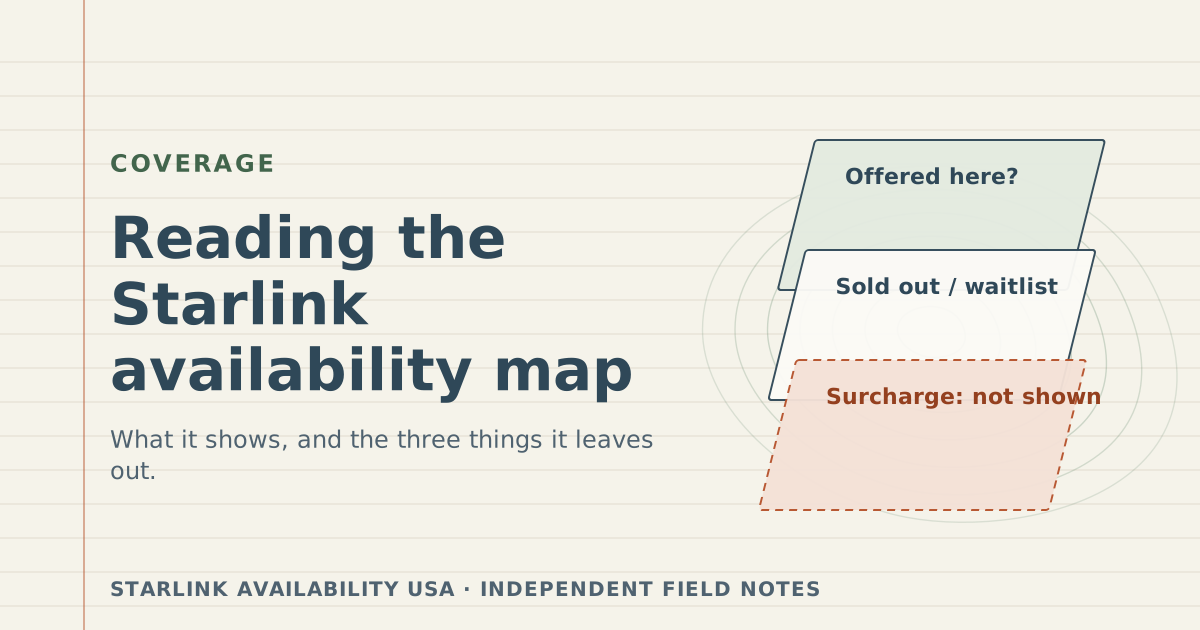
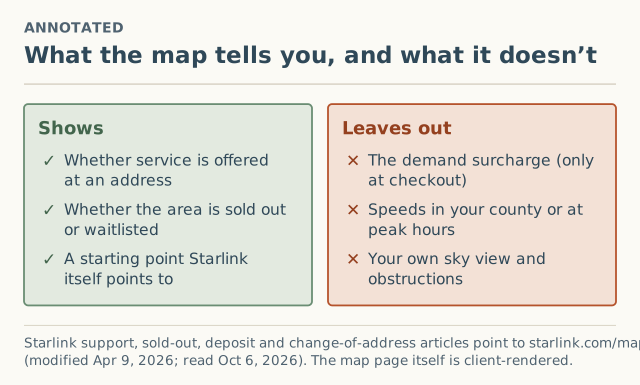
Starlink’s availability map, at starlink.com/map, tells you whether Starlink is offered at an address and whether the area is marked sold out or waitlisted. It does not tell you three things that often decide whether to buy: whether checkout will add a one-time demand surcharge, how fast service actually is in your county at busy hours, and whether your own trees or roof block the view of the sky. Read the map first, then check those three separately.
This guide explains what the map is for (in Starlink’s own words), each gap, the order of checks that avoids surprises, and what we couldn’t verify about the map itself.
What the map answers
The map is the first place Starlink’s own help articles send people:
- The sold-out article describes regions that “show as ‘sold out’ on our availability map.”
- The deposit article recommends checking “our Starlink availability map to review when the service will be available,” adding “service availability is subject to change.”
- The change-of-address article says that if a change fails, “you may review availability on the Starlink coverage map at starlink.com/map.”
So the map is Starlink’s answer to two questions: is service offered around this address, and is it full? You type the address on starlink.com. This site never asks for it and never sees it.
“Coverage map” or “availability map”?
People search for both, and so does Starlink: its help articles mostly say “availability map,” and its change-of-address article says “coverage map,” at the same address. In practice “coverage” here means where Starlink offers service, not a promise about speed or reliability at your house. There’s one map; the name doesn’t change what it shows.
What it leaves out
1. The demand surcharge
Starlink says the surcharge “is determined by: your service address; the service plan selected,” and it applies at checkout. It isn’t shown on the map, and Starlink publishes no list of amounts. To see it, start an order with your real address and plan and stop at the summary (how). The press has reported amounts from $100 (September 2024) to $1,500 (2026) in different places, all unverified; our surcharge page keeps that record separate from reader reports.
2. Real-world speeds
The map doesn’t show what people near you actually get. Starlink’s plan pages give typical ranges, and its slow-speeds article says peak hours are “typically between 6pm and 11pm local time,” when “you may experience varying or slower speeds.”
| Plan (US Residential) | Typical download | Typical upload |
|---|---|---|
| Residential Max | up to 400+ Mbps | 20–40 Mbps |
| Residential 200 Mbps (select areas) | 80–200 Mbps (capped at 200) | 15–35 Mbps |
| Residential 100 Mbps (select areas) | capped at 100 Mbps | 15–35 Mbps |
Ranges from Starlink’s support pages, verified October 5, 2026. These are plan figures, not measurements of your county. Our speeds by county will show medians once a county reaches 20 unobstructed tests; until then you’ll see “not enough reports yet.”
3. Your sky view
Starlink: “Objects such as a tree branch, pole or roof, that obstruct this connection between Starlink and the satellite, may cause service interruptions.” Its advice: “For users in heavily obstructed areas, we recommend checking for obstructions… prior to ordering Starlink.” The map can’t know where you’d put the dish. The app’s “Check for Obstructions” scan can. Fixing obstructions and installation are outside what this site covers.
Check in this order
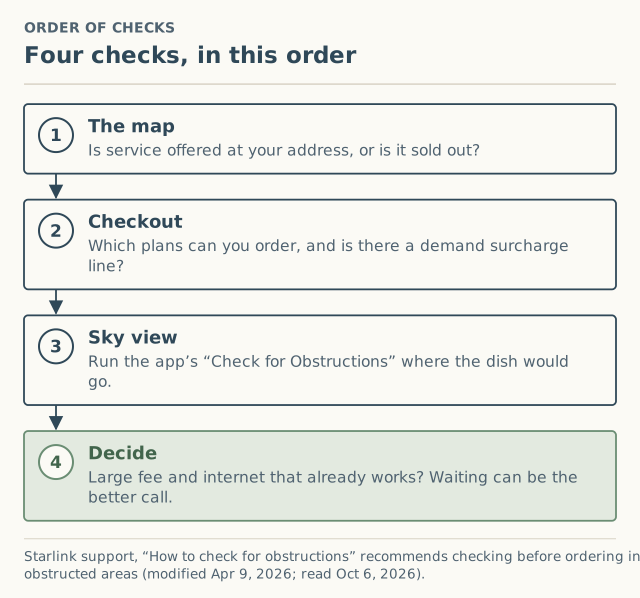
- The map. Offered at your address? Sold out?
- Checkout. Which plans can you order there, and is there a demand surcharge line? Stop before placing the order.
- Sky view. Run “Check for Obstructions” in the Starlink app at the spot where the dish would go, holding the phone “as close as possible to the height and perspective of Starlink.”
- Decide. A large fee and internet that already works is a good reason to wait. A $0 line and a clear sky is a good reason to consider it seriously.
Worked example (hypothetical)
A reader in a wooded county types their address on starlink.com/map. It shows service, not sold out.
- Checkout with Residential at their real address shows a surcharge line. They note the date, plan and amount, and stop.
- Sky view: the app scan from the roof line shows trees blocking part of the northern sky.
- Decision: they have 5G home internet that works. The surcharge and the obstruction both point the same way: keep 5G, re-check Starlink’s checkout in a few months.
The map’s answer, “available,” was correct. It just wasn’t the whole answer.
When the map and checkout disagree
It happens, and Starlink documents some reasons: Residential can be at capacity while Roam or Priority is offered, “availability for business plans may differ,” availability changes over time, and some locations are “not yet active for service.” When they disagree, checkout wins. Full walk-through: why the map says available but checkout says sold out.
How Starlink’s own articles use the map
The map turns up in three different Starlink help articles, each for a different moment. Knowing which moment you’re in tells you what to look for.
| Your situation | Starlink article | What it says to use the map for |
|---|---|---|
| Buying for the first time | Sold-out article | Checking whether your region “shows as ‘sold out’” before you order |
| On the waitlist | Deposit article | Reviewing “when the service will be available,” with the caveat that availability “is subject to change” |
| Moving an existing dish | Change-of-address article | Checking why an address change failed: the new location “may be at capacity or not yet active for service” |
In all three, the map is a first look. The next step is always checkout or the account flow, where your exact address and plan are evaluated.
Using the map for a place you don’t live yet
People often check the map for a house they’re thinking of buying, a lot they plan to build on, or a rental they might move to. That’s a sensible first step, with three cautions:
- Use the exact address or parcel location. New builds and long rural driveways often resolve to the road, not the house site.
- Treat the answer as a snapshot. Availability “is subject to change,” and a move months from now is a different moment. If you already have Starlink, moving it later is an address change with its own surcharge rules: see changing your service address.
- Don’t place a deposit or order for an address you don’t control yet just to “hold a spot.” Starlink’s deposit and service address both belong to the location where the dish will actually be used.
A note on privacy when you check
Type the address only on starlink.com. A third-party page that offers to check Starlink availability for you has to enter it into Starlink’s site anyway, and you don’t know what else it keeps. Our pages link to the map but never embed it or ask for your address; our report form stops at the county, for reasons explained in why we never ask for your street address.
What to do with each map result
| The map shows | What it means | Next step |
|---|---|---|
| Service at your address | Offered; plans and fees still unknown | Checkout, then sky check |
| Sold out or waitlist | Residential at capacity there | Deposit at your real address, or another provider |
| No service | Not active at that location | Reasons and next steps |
What we couldn’t verify
- The map’s own labels and legend. The page is rendered in the browser; when we checked it, no readable text (legend, sold-out markers) could be extracted. We describe it through Starlink’s help articles, which is also why we don’t reproduce its colors or look.
- How often it updates. Starlink doesn’t say.
- Whether it reflects plan-level availability. Starlink’s articles describe plan differences at checkout and activation; they don’t say whether the map shows them.
Common mistakes
- Treating “available” as “ready to order at $0.” Check checkout for a surcharge.
- Assuming plan speed ranges describe your county. They don’t, especially in the evening.
- Skipping the sky check. It’s the one problem no map can see.
- Typing a nearby address because the map “looks better” there. Service is only guaranteed at the service address on your account. See why a friend’s address backfires.
What to do next
- Run the full step-by-step availability check.
- If the map says no, read not available at my address.
- Our short coverage guide has the same four-step order with links.
- If checkout showed a surcharge, $0, or sold out, add it to the record. We ask for your county, never your address.
Questions people ask
Where is the Starlink availability map?
Does the Starlink map show the demand surcharge?
Is the Starlink coverage map the same as the availability map?
How accurate is the Starlink availability map?
Does the Starlink map show speeds in my area?
Is it safe to enter my address on the Starlink map?
Sources
- Starlink availability map (retrieved Oct 6, 2026)
- Starlink support: My region is at capacity or shows as "sold out" on the availability map. What does that mean? (modified Apr 9, 2026) (retrieved Oct 6, 2026)
- Starlink support: Deposit/Pre-Order - Status and how to confirm my order when it's my turn (modified Apr 9, 2026) (retrieved Oct 6, 2026)
- Starlink support: How do I change my service address? (modified Apr 9, 2026) (retrieved Oct 6, 2026)
- Starlink support: What is a demand surcharge? (modified Apr 9, 2026) (retrieved Oct 6, 2026)
- Starlink support: How to check for obstructions (modified Apr 9, 2026) (retrieved Oct 6, 2026)
- Starlink support: Slow Speeds - Outside/During Peak Hours (modified Apr 9, 2026) (retrieved Oct 6, 2026)
- Starlink support: What are the Residential plans? (modified Apr 8, 2026) (retrieved Oct 6, 2026)
Related guides
Coverage
Is Starlink available in my area? A step-by-step check
Check if Starlink is available at your address in four steps: the map, checkout, a surcharge check and a sky check. What each answer means and what to do next.
Coverage
Why the Starlink map says available but checkout says sold out
Starlink's map shows service but checkout says sold out or offers only a deposit? The likely reasons, which are documented, and the steps to sort it out.
Coverage
Starlink not available at my address: reasons and next steps
Starlink says it's not available at your address? The likely reasons, how to tell sold out from not yet active, the Roam-only case, and what to do next.