Key takeaways
- Start at starlink.com/map with your exact service address. It shows whether service is offered and whether the area is sold out.
- Then go to checkout: it shows which plans you can actually order there and whether a demand surcharge applies.
- Run the Starlink app's “Check for Obstructions” where the dish would go. Starlink recommends it before ordering in obstructed spots.
- As of Oct 6, 2026, Starlink says there are currently no sold-out regions in the US.
- The FCC National Broadband Map lists providers that report service at your location, which helps you compare alternatives.
On this page
- The four-step check
- Four tools, and what each can tell you
- What each result means
- Worked example (hypothetical)
- When Starlink is the wrong choice
- Privacy: who sees your address
- Special cases
- How long your answer stays good
- What “available” doesn’t promise
- What we don’t know
- Common mistakes
- What to do next
- Questions people ask
- Sources
To check whether Starlink is available in your area, type your exact address on Starlink’s availability map at starlink.com/map, then start an order at checkout with the same address and the plan you’d choose. The map tells you whether service is offered and whether the area is sold out. Checkout tells you which plans you can actually order and whether a one-time demand surcharge applies. Finish with the Starlink app’s obstruction check at the spot where the dish would go.
As of October 6, 2026, Starlink’s reactivation article says “there are currently no sold-out regions in the United States.” So for most US addresses the real questions are whether service is active at that exact address, what checkout adds, and whether your sky is clear enough.
The four-step check
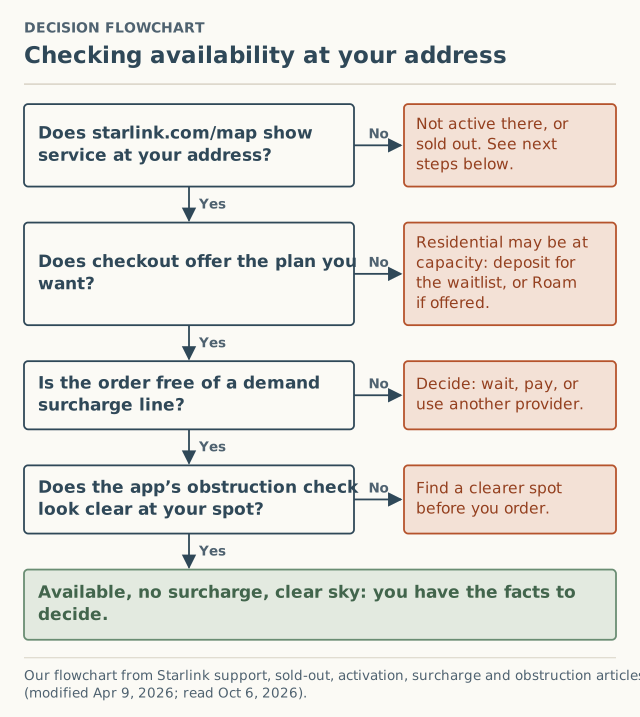
Step 1: the map
Go to Starlink’s availability map and type the address where the dish will be used: your service address, not a mailing address. Starlink’s own articles point here to check availability and capacity. Note what it shows: offered, sold out, or nothing.
What the map can’t tell you is covered in how to read the availability map.
Step 2: checkout
Start an order with the same address and the plan you’d actually buy. Watch for three outcomes:
- An order you can place. Service is available on that plan. Go to step 3.
- A deposit offer, or “sold out.” Starlink: residential service “is at capacity and residential service activations are currently not possible.” See how the waitlist works.
- Only Roam offered. Starlink’s activation article: “Standard and Priority plans cannot be activated in capacity-limited areas,” and you can’t switch from Roam to Standard or Priority “until your area has available capacity.”
Step 3: the surcharge line
Before you place the order, read the summary for a “demand surcharge” line. Starlink says it’s set by “your service address” and “the service plan selected,” and the map doesn’t show it. Write down the date, plan and amount, then stop. Details: check for a surcharge before you order.
Step 4: the sky
Starlink: “Objects such as a tree branch, pole or roof, that obstruct this connection between Starlink and the satellite, may cause service interruptions.” In the Starlink app, choose “Check for Obstructions” and scan from where the dish would sit, with the phone “as close as possible to the height and perspective of Starlink.” Starlink recommends doing this “prior to ordering” in heavily obstructed areas. Installation and fixing obstructions are outside what we cover.
Four tools, and what each can tell you
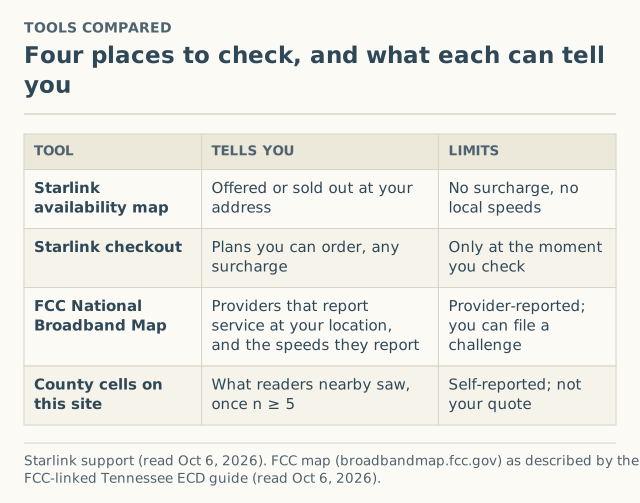
| Tool | Tells you | Limits |
|---|---|---|
| Starlink availability map | Offered or sold out at your address | No surcharge, no local speeds |
| Starlink checkout | Plans you can order, any surcharge | Only true for the moment you check |
| FCC National Broadband Map | Providers that report service at your location | Provider-reported; you can file a challenge |
| County cells on this site | What readers nearby saw, once a county has 5+ reports | Self-reported; never your quote |
About the FCC map. The FCC’s National Broadband Map, at broadbandmap.fcc.gov, “displays where internet services are and are not available across the country, as reported by internet service providers,” as Tennessee’s broadband office describes it. You search your address and see the service reported there. If a listed service isn’t actually available for purchase, or your location is missing, the map accepts a challenge. It’s the quickest way to see what else might be at your address before deciding on Starlink.
What each result means
| What you found | What it means | Next step |
|---|---|---|
| Offered, orderable, $0 surcharge, clear sky | Available, with no extra fee shown | Decide on Starlink’s merits; your checkout is the real quote |
| Offered, orderable, with a surcharge | Available in a high-demand area | Wait, pay or switch: legitimate options |
| Deposit offered / sold out | Residential at capacity there | Waitlist or another provider |
| Only Roam offered | Capacity-limited for Residential | Decide whether Roam suits you; we don’t advise on plans |
| Not offered at all | Not active at that location | Reasons and next steps |
| Obstructed sky | Service interruptions likely | Find a clearer spot before ordering |
Worked example (hypothetical)
A household in a rural county runs the four steps:
- Map: service shown, not sold out.
- Checkout: Residential can be ordered. Good.
- Surcharge: the summary shows one. They note “Oct 6, 2026 · Residential · surcharge shown · amount · county,” and stop.
- Sky: the app scan from the shed roof is clear.
They also look up the FCC map and see a fixed-wireless provider reporting service at their location. Now they’re comparing real options: Starlink with a known one-time fee, or the local provider. To put the surcharge inside a full first-year figure, the year-1 cost calculator on our sister cost site includes it.
When Starlink is the wrong choice
- Checkout shows a large surcharge and you have fiber, cable or 5G home internet that works. Keep it; re-check later.
- Your only clear spot is still heavily obstructed. Starlink itself warns of interruptions.
- You’d need to use a different address to get a better answer. Service is only guaranteed at the service address on your account. See why a friend’s address backfires.
Privacy: who sees your address
You have to type your address into Starlink’s map and checkout. That’s the only place it needs to go. A third-party site offering to “check Starlink availability” for you would have to type it into Starlink’s site anyway. This site never asks for your address; our reports use the county only, and say why on the method page.
Special cases
Buying a home or building
Run steps 1 and 4 for the property before you commit, using the exact house site. A map answer is a snapshot, and a sky check at a bare lot can change once the house and trees are in place. If you’ll move an existing Starlink there, read the move rules in changing your service address: a move into a high-demand area “may” require a new surcharge.
Renting
The service address is where the dish will be used, which is the rental. Check with the landlord about where a dish can go before running the sky check, and remember that moving out later is an address change.
A second home or cabin
A second home is a separate service line with its own address, its own availability and its own surcharge evaluation, because Starlink applies surcharges “per service line, not per account.” Using a Residential dish from your main home at the cabin without updating the address “may result in loss of connectivity or reduced performance,” Starlink says.
How long your answer stays good
Every result in this check is for the moment you ran it. Starlink says availability is “subject to change” and that surcharge amounts “may change based on network capacity and regional demand.” If you’re not ordering right away, write down the date and each result, then repeat the check when you’re ready to decide. Comparing two dated checks tells you more than either one alone.
What “available” doesn’t promise
An order you can place means Starlink will activate service at your address. It doesn’t promise a speed. Starlink’s plan pages give typical ranges (for Residential Max, “up to 400+ Mbps” download and 20–40 Mbps upload; the 200 and 100 Mbps plans are capped), and its slow-speeds article says that during peak hours, “typically between 6pm and 11pm local time,” you “may experience varying or slower speeds.” Our county speed cells will show what readers actually measured once a county has 20 unobstructed tests; until then, the plan ranges and the peak-hour note are the honest expectation.
What we don’t know
- Whether the map is plan-specific. Starlink describes plan differences at checkout and activation; its articles don’t say whether the map reflects them.
- How often availability changes. Starlink says only that it’s “subject to change.”
- What readers in your county saw. No county has reached our 5-report threshold yet (0 reports as of October 5, 2026).
Common mistakes
- Stopping at the map. It doesn’t show the fee or your sky.
- Typing a mailing address. Use where the dish will be.
- Buying hardware before checking checkout. A store kit doesn’t change what your address allows.
- Ignoring other providers. The FCC map takes a minute.
What to do next
- Do steps 1–4 now; it takes about ten minutes.
- Our coverage guide has the same order in short form.
- If checkout showed a surcharge, $0 or sold out, add it to the record. We ask for your county, never your address.
Questions people ask
How do I check if Starlink is available at my address?
Is Starlink available everywhere in the US?
Why does Starlink say available but show a surcharge?
Can I check Starlink availability without giving my address to anyone?
What other internet options are at my address?
Do I need a clear view of the sky?
Sources
- Starlink availability map (retrieved Oct 6, 2026)
- Starlink support: My region is at capacity or shows as "sold out" on the availability map. What does that mean? (modified Apr 9, 2026) (retrieved Oct 6, 2026)
- Starlink support: How do I reactivate service? (modified Apr 9, 2026) (retrieved Oct 6, 2026)
- Starlink support: How do I activate my Starlink? (modified Apr 9, 2026) (retrieved Oct 6, 2026)
- Starlink support: What is a demand surcharge? (modified Apr 9, 2026) (retrieved Oct 6, 2026)
- Starlink support: How to check for obstructions (modified Apr 9, 2026) (retrieved Oct 6, 2026)
- Starlink support: How do I change my service address? (modified Apr 9, 2026) (retrieved Oct 6, 2026)
- Tennessee Dept. of Economic and Community Development: FCC Broadband Mapping Challenge (explains the FCC National Broadband Map) (retrieved Oct 6, 2026)
Related guides
Coverage
How to read the Starlink availability map, and what it leaves out
What Starlink's availability map tells you about your address, what it doesn't show (surcharge, local speeds, obstructions), and the order to check things in.
Coverage
Starlink not available at my address: reasons and next steps
Starlink says it's not available at your address? The likely reasons, how to tell sold out from not yet active, the Roam-only case, and what to do next.
Surcharges
How to check for a Starlink surcharge before you order
The only place a Starlink demand surcharge shows is checkout. How to get a real quote at your address, what to write down, and where to stop before paying.