Key takeaways
- Rule out the simple cause first: the address on Starlink's map and checkout must be the exact place where the dish will be used.
- If the area is sold out, Starlink offers a deposit and a place in line, with no timeline.
- If only Roam is offered, Starlink says you can't switch to Standard or Priority until the area has capacity.
- If the location isn't active for service, there's no line to join. Look at other providers and re-check later.
- A store-bought kit doesn't change any of this: activation still depends on your address.
On this page
If Starlink says it isn’t available at your address, there are four likely reasons: the address entered isn’t exactly where the dish will be, the area is sold out (Residential at capacity), Residential is full but Roam is offered, or the location isn’t active for service yet. The first is a fix you can make in a minute. The second gives you a waitlist. The third gives you a different plan. The fourth gives you nothing from Starlink for now, so the useful move is to look at other providers and re-check later.
Starlink’s reactivation article says “there are currently no sold-out regions in the United States” (modified April 9, 2026, re-read October 6, 2026). If your address still says no, the cause is more likely the address itself, a plan-level limit, or a location that isn’t active.
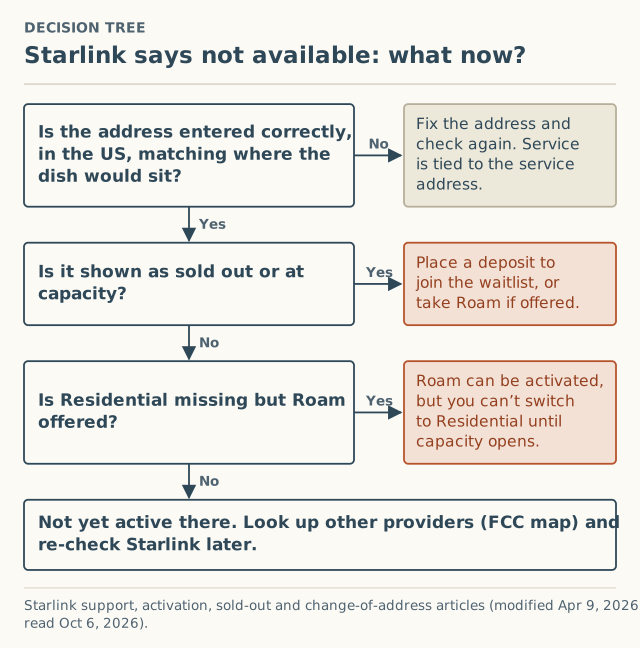
A decision tree for “not available”
1. Is the address right?
Starlink ties service to the service address: “Starlink service is only guaranteed at the service address listed on your account.” If you typed a mailing address, a PO box, or an address that resolves to the wrong spot (common with new builds and long rural driveways), the answer you got is for the wrong place. Re-enter the exact address where the dish will sit, on Starlink’s availability map and at checkout, and check the result again.
2. Is it sold out?
Starlink: if your region shows as sold out, “residential service is at capacity and residential service activations are currently not possible.” You can place a deposit for your service location and get an email when you’re next in line. There’s no timeline: “We are unable to provide timelines for residential service availability in any sold out regions.” Details in how the waitlist works.
3. Is Residential missing but Roam offered?
Starlink’s activation article: “Standard and Priority plans cannot be activated in capacity-limited areas… If there is no capacity in the area, there will be an option to activate with a Roam service plan. Please note, you will be unable to switch from a Roam service plan to a Standard or Priority service plan until your area has available capacity.”
That’s a real choice, not a workaround. Whether Roam suits a home is a plan question we don’t cover. Just know the switch to Residential waits on capacity.
4. Is the location not active?
Starlink’s change-of-address article describes a location that “may be at capacity or not yet active for service.” Not yet active is different from full: there’s no deposit-and-notify process described for it. Starlink says it is “constantly adding capacity,” and that availability is “subject to change,” but gives no dates.
Alternatives to look up now
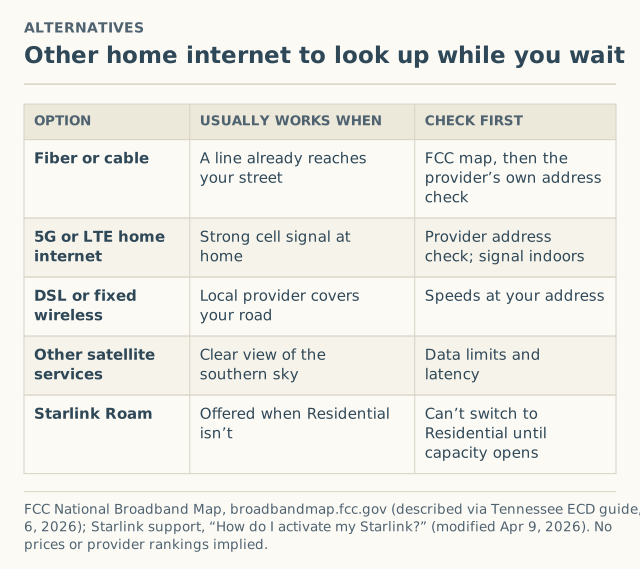
The fastest way to see what else is at your address is the FCC National Broadband Map at broadbandmap.fcc.gov. As Tennessee’s broadband office describes it, the map “displays where internet services are and are not available across the country, as reported by internet service providers.” You search your address and see the services reported there. If a listed service isn’t really available for purchase, or your home is missing, you can file a challenge.
| Option | Usually works when | Check first |
|---|---|---|
| Fiber or cable | A line already reaches your street | FCC map, then the provider’s own address check |
| 5G or LTE home internet | Strong cell signal at home | The provider’s address check; signal indoors |
| DSL or fixed wireless | A local provider covers your road | Speeds offered at your address |
| Other satellite services | Clear view of the southern sky | Data limits and latency |
| Starlink Roam | Offered when Residential isn’t | Can’t switch to Residential until capacity opens |
We don’t compare providers head to head or quote prices. The point is to know your options before you wait on one.
Worked example (hypothetical)
A family is building on a new parcel at the end of a county road.
- Address: the map search drops the pin on the road, not the house site. They re-enter it carefully at checkout; still no Residential order offered.
- Sold out? No sold-out notice and no deposit offer.
- Roam? Checkout offers Roam.
- Decision: they move in next spring. They look up the FCC map, find a fixed-wireless provider reporting service, and plan to re-check Starlink’s map in a few months. If they take Roam in the meantime, they know they can’t switch to Residential until capacity opens.
Re-checking: how often?
Starlink gives no schedule, so any interval is a guess. Re-checking whenever you’re making a real decision (moving, contract ending, current service failing) is more useful than checking daily. When you check, use the same address and plan each time and write down the date and result, so you can tell whether anything changed.
Edge cases
- Owners moving into a new address. A failed address change can mean the new location is at capacity or not yet active. Starlink points to the map or a Roam plan. See changing your service address.
- Owners resuming service. Resuming Residential depends on capacity, but Starlink currently says US customers “can resume Residential service without delay.”
- Business plans. “Availability for business plans may differ from residential service.”
- Outside the US states. This site covers US states and DC only.
Common mistakes
- Buying a store kit and hoping. Starlink says Standard and Priority “cannot be activated in capacity-limited areas,” and asks retail buyers to check the address on its order page first.
- Using a nearby address that shows service. Service is only guaranteed at the address on your account. See why a friend’s address backfires.
- Waiting without looking at alternatives. The FCC map takes a minute.
- Confusing “not available” with “sold out.” Only sold out has a waitlist. Compare them in sold out vs waitlist vs not available.
Checking a property before you buy or build
If you’re looking at a house or land and Starlink matters to you, check before you commit:
- Map the exact site. Drop the location on the house or building site, not the road.
- Try checkout with that address to see which plans are offered (you can stop before ordering).
- Look up the FCC map for the same location to see which other providers report service.
- Visit with the Starlink app and run “Check for Obstructions” where a dish would go.
- Write down the date of each result. Availability is “subject to change”; a check months before moving in is a snapshot, not a promise.
If the site isn’t active for Starlink today, the FCC map tells you what else you could rely on in the meantime.
What to ask Starlink support
Support can’t make a location active, but it can confirm what your account sees. Useful, specific questions:
- Is my service address recorded exactly as I entered it?
- Is this location sold out (at capacity) or not yet active?
- Which plans can be activated at this address today?
- If I take Roam now, what has to change before I can switch to Residential? (Starlink’s article: available capacity.)
If you need internet now
Waiting on Starlink with no date is only reasonable if you have something to use meanwhile. A practical order:
- Look up your location on the FCC map and list every provider and technology reported there.
- Check each provider’s own address tool, since the FCC map shows what providers report, and you can challenge listings that are wrong.
- Ask neighbors what they use. It’s the fastest real-world check of what works on your road.
- Decide whether Roam fits, if Starlink offers it at your address, knowing the switch to Residential waits for capacity.
- Set a reminder to re-check Starlink’s map when you next make an internet decision.
What we don’t know
- Why a specific location isn’t active. Starlink doesn’t publish it.
- When it will be. No dates are given.
- How common this is by county. Our form records sold-out results by county; “not offered at all” isn’t a checkout result we can collect, because there’s no checkout to report from.
What to do next
- Re-run the step-by-step availability check with the exact address.
- Read our short not-available guide and how to read the availability map.
- If checkout showed a sold-out or waitlist message, report it with the month and plan. We ask for your county, never your address.
Questions people ask
Why is Starlink not available at my address?
Will Starlink become available at my address?
Starlink only offers Roam at my address. Can I switch to Residential later?
Can I buy a Starlink at a store and activate it anyway?
What are my alternatives if Starlink isn't available?
Is Starlink sold out in the US?
Sources
- Starlink support: How do I activate my Starlink? (modified Apr 9, 2026) (retrieved Oct 6, 2026)
- Starlink support: My region is at capacity or shows as "sold out" on the availability map. What does that mean? (modified Apr 9, 2026) (retrieved Oct 6, 2026)
- Starlink support: How do I change my service address? (modified Apr 9, 2026) (retrieved Oct 6, 2026)
- Starlink support: How do I reactivate service? (modified Apr 9, 2026) (retrieved Oct 6, 2026)
- Starlink support: Deposit/Pre-Order - Status and how to confirm my order when it's my turn (modified Apr 9, 2026) (retrieved Oct 6, 2026)
- Tennessee Dept. of Economic and Community Development: FCC Broadband Mapping Challenge (explains the FCC National Broadband Map) (retrieved Oct 6, 2026)
Related guides
Coverage
Is Starlink available in my area? A step-by-step check
Check if Starlink is available at your address in four steps: the map, checkout, a surcharge check and a sky check. What each answer means and what to do next.
Sold out
Sold out vs waitlist vs not available: three Starlink states
Starlink sold out, waitlist and not available mean different things. How to tell which one you're in, what each means, and the right next step for each.
Coverage
How to read the Starlink availability map, and what it leaves out
What Starlink's availability map tells you about your address, what it doesn't show (surcharge, local speeds, obstructions), and the order to check things in.