Key takeaways
- Sold out: Residential is at capacity at that location and new Residential activations aren't possible. Starlink gives no timeline.
- Waitlist: what you're on after placing a deposit for a sold-out location. You get an email when it's your turn and 7 days to confirm.
- Not available: the location isn't active for service. Starlink's wording is “not yet active for service.”
- In all three, Starlink gives no dates. In the first two, Roam (or Priority, on reactivation) may be offered.
- As of Oct 6, 2026, Starlink says there are no sold-out regions in the US.
On this page
- The three states, side by side
- Which state are you in?
- The right next step for each
- Worked examples (hypothetical)
- Edge cases
- How the three states show up for existing owners
- Before you place a deposit
- Starlink’s words, and which state they mean
- What we don’t know
- Common mistakes
- What to do next
- Questions people ask
- Sources
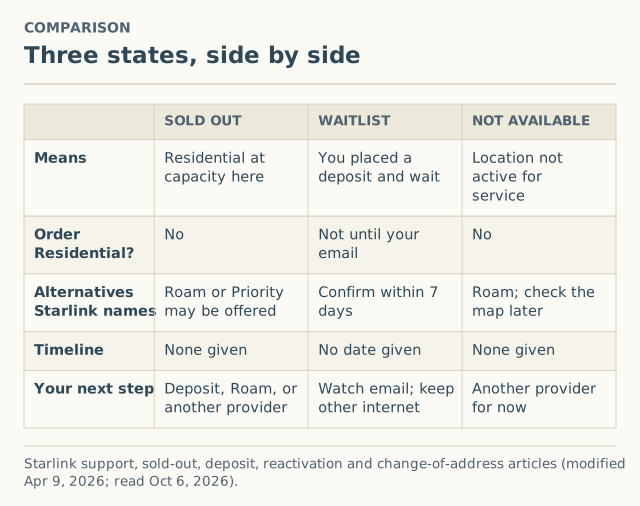
“Sold out” means Starlink Residential is at capacity at your location. The “waitlist” is what you join, by placing a deposit, when a location is sold out. “Not available” means the location isn’t active for service at all. The first is about the area being full, the second is about your place in line, and the third is about service not being offered there yet. Each needs a different next step.
As of October 6, 2026, Starlink’s reactivation article says there are no sold-out regions in the US, so for most US addresses the realistic outcomes today are “available” or “not available.” The other two come back whenever capacity runs short, and press reports show they did in 2024 and 2025.
The three states, side by side
Sold out (at capacity)
Starlink: if your region shows as sold out on the availability map, “residential service is at capacity and residential service activations are currently not possible.” It also says: “We are unable to provide timelines for residential service availability in any sold out regions.” Business availability “may differ.” For reactivations, Starlink says Roam or Priority is offered when Residential has no capacity; for new activations, its activation article says Roam may be offered.
More detail: what “sold out” means.
Waitlist (deposit placed)
The waitlist isn’t a property of the area; it’s your status once you place a deposit for a sold-out location. Starlink’s deposit article: an unconfirmed pre-order “means you are still on the waitlist,” and “we do not have a specific date.” When you’re next, you get the email “Your Starlink is ready! Confirm your order in the next 7 days.” If you don’t confirm, the deposit is cancelled and fully refunded.
More detail: how the waitlist works.
Not available (not yet active)
This is the case where service isn’t offered at the location at all. Starlink’s change-of-address article puts it in one line: “The requested location may be at capacity or not yet active for service.” Being “not yet active” is different from being full. Starlink’s articles describe a deposit-and-notify process for sold-out regions, not for locations that aren’t active.
More detail: not available at my address.
Which state are you in?
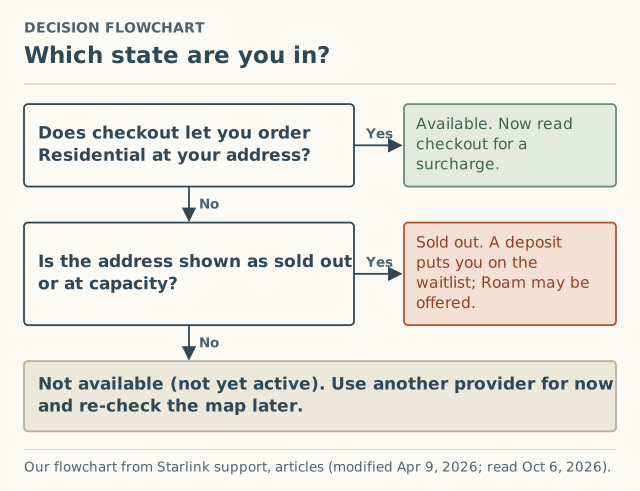
- Does checkout let you order Residential at your real address? Yes means available. Read the order summary for a demand surcharge before you place it.
- Is the address shown as sold out or at capacity, or does checkout offer a deposit? Yes means sold out. A deposit puts you on the waitlist.
- Neither? The location isn’t active for service right now.
Use checkout, not just the map. The map is where Starlink sends you first, but the two can disagree, and checkout is where the order is actually accepted or not.
The right next step for each
| State | Good next step | When that’s the wrong move |
|---|---|---|
| Available, $0 surcharge | Check your sky view in the app, then decide on Starlink’s merits | You haven’t checked obstructions |
| Available, with a surcharge | Decide: wait, pay or switch (how) | You have fiber, cable or 5G home internet that works and the fee is large |
| Sold out | Deposit at your real address if you’d really buy; or take Roam if it suits you | You’d cancel working internet while you wait |
| On the waitlist | Keep your current internet; watch for the 7-day email | You might move: the deposit is for that location |
| Not available | Look up other providers; re-check Starlink later | You’d buy a kit hoping it activates anyway |
Worked examples (hypothetical)
A family in a growing suburb, 2024. Press reported sold-out areas around Seattle, Spokane, Portland, San Diego, Sacramento and Austin in November 2024 (unverified). A family there sees a deposit offer at checkout. They are in the sold out state. If they pay the deposit, they move to the waitlist state. In January 2026, SatelliteInternet.com reported Washington and Oregon were no longer marked sold out, which is when a waitlisted household there might have expected the email. That’s a press date, not a measured wait.
A cabin owner on a new road. The map doesn’t show service; checkout won’t take an order or a deposit. That’s not available. The useful move is to look up other providers and re-check Starlink later, not to buy hardware.
An owner resuming after Standby. If the area were at capacity, Starlink says they couldn’t get Residential back but could “resume service immediately on any plan available in your area.” Standby “does not reserve your spot on a Residential plan.” Today Starlink says US customers can resume Residential “without delay.”
Edge cases
- Roam offered, Residential not. That’s the capacity-limited case. Starlink: you “will be unable to switch from a Roam service plan to a Standard or Priority service plan until your area has available capacity.”
- Business plans. Can be available when Residential is sold out: “Availability for business plans may differ.”
- Store-bought kits. Starlink says Standard and Priority “cannot be activated in capacity-limited areas.” A kit doesn’t change which state your address is in.
- Address changes. An owner moving into a full or inactive location will see the change fail. Starlink points to the map or a Roam plan. See changing your service address.
How the three states show up for existing owners
The same three states apply when you already have Starlink and change something:
| Situation | Sold out / at capacity | Not available (not yet active) |
|---|---|---|
| Resuming after Standby or cancelling | Residential depends on capacity; Roam or Priority offered if none | Not described separately by Starlink |
| Changing service address | Change can fail: the location “may be at capacity” | Change can fail: the location may be “not yet active for service” |
| Switching Residential plans | Changes are “subject to availability in your area” | Not described separately by Starlink |
For owners, there’s no waitlist step described in the articles we read: the flow either succeeds, offers another plan, or fails. Starlink currently says US customers “can resume Residential service without delay.”
Before you place a deposit
- Will the dish really live at this address? The deposit is for that service location.
- Do you have internet that works while you wait? There’s no date.
- Will you see the email? The 7-day window starts on the email date.
- Have you checked your sky? A deposit doesn’t help if the site is heavily obstructed.
Starlink’s words, and which state they mean
| Wording you might see | Where Starlink uses it | State |
|---|---|---|
| “Sold out” | Sold-out article, availability map | Sold out |
| “At capacity” | Sold-out article title, address-change article | Sold out |
| “Capacity-limited areas” | Activation article | Sold out (for Residential) |
| “Deposit,” “pre-order” | Deposit and sold-out articles | Waitlist |
| “Confirm your order in the next 7 days” | Deposit article (email subject) | Waitlist, your turn |
| “Not yet active for service” | Change-of-address article | Not available |
| “Service availability is subject to change” | Sold-out and deposit articles | Any of them, over time |
What we don’t know
- How long each state lasts. Starlink gives no timelines. The press record shows some sold-out areas cleared about 14 months after they were first reported, but that’s two article dates, not a measured wait.
- How Starlink decides a location is “active.” Not published.
- How often people hit each state now. Our report form records “sold out, at capacity, or a waitlist” as a checkout result by county and month. As of October 5, 2026 we had 0 reports.
Common mistakes
- Calling every “no” a waitlist. If the location isn’t active, there’s no line to join.
- Placing a deposit you don’t intend to use. It’s for one location. Starlink’s deposit article describes a full refund when you don’t confirm within the 7 days; it doesn’t describe other cases.
- Buying hardware first. Check checkout at your address before you buy anything.
- Treating “available” as the end of the check. Read the order summary for a surcharge.
What to do next
- Check your address at checkout and place yourself in one of the three states.
- Read the deeper guide for your state: sold out, waitlist or not available.
- See the dated sold-out and waitlist log, and the coverage guide for what Starlink’s map shows.
- If checkout told you an area is full, report it with the month and plan. We ask for your county, never your address.
Questions people ask
What's the difference between Starlink sold out and waitlist?
What does Starlink “not available” mean?
Can I join a waitlist if Starlink isn't available at my address?
Is Roam an option if Residential is sold out?
How do I know which state my address is in?
Sources
- Starlink support: My region is at capacity or shows as "sold out" on the availability map. What does that mean? (modified Apr 9, 2026) (retrieved Oct 6, 2026)
- Starlink support: Deposit/Pre-Order - Status and how to confirm my order when it's my turn (modified Apr 9, 2026) (retrieved Oct 6, 2026)
- Starlink support: How do I reactivate service? (modified Apr 9, 2026) (retrieved Oct 6, 2026)
- Starlink support: How do I change my service address? (modified Apr 9, 2026) (retrieved Oct 6, 2026)
- Starlink support: How do I activate my Starlink? (modified Apr 9, 2026) (retrieved Oct 6, 2026)
- Starlink support: How does pausing service work? (modified Apr 9, 2026) (retrieved Oct 6, 2026)
- SatelliteInternet.com: Starlink sold out, waitlist returns, Nov 18, 2024 (retrieved Oct 5, 2026)
- SatelliteInternet.com: Starlink congestion surcharge (sold-out status lifted in NC, OR, WA), Jan 27, 2026 (retrieved Oct 5, 2026)
Related guides
Sold out
What “sold out” means on Starlink: capacity, not stock
Starlink “sold out” or “at capacity in your area” means Residential is full at that location, not a hardware shortage. What it means, US status now, what to do.
Sold out
How the Starlink waitlist works, step by step
Does Starlink have a waitlist? How the deposit works, why there's no date, the 7-day confirmation email, refunds, and what the US status is as of October 2026.
Coverage
Starlink not available at my address: reasons and next steps
Starlink says it's not available at your address? The likely reasons, how to tell sold out from not yet active, the Roam-only case, and what to do next.