Key takeaways
- The map answers whether service is offered around an address and whether the area is marked sold out. Checkout answers what you can order at that exact address, on that plan, today.
- Starlink documents several reasons the two can differ: Residential can be full while Roam or Priority is offered, availability changes over time, business availability differs, and some locations aren't yet active.
- When they disagree, checkout wins. It is the step that actually places, or refuses, the order.
- As of Oct 6, 2026, Starlink says there are no sold-out regions in the US, so a sold-out checkout today is worth reporting.
- Don't buy a store kit to get around it. Starlink says Standard and Priority plans can't be activated in capacity-limited areas.
On this page
When Starlink’s map says service is available but checkout says sold out, offers only a deposit, or offers only Roam, it’s usually because the two tools answer different questions. The map describes availability for an area. Checkout evaluates your exact service address, on the plan you picked, at that moment. Starlink documents several ways those can differ, and when they disagree, checkout is the one that counts.
Below: what each tool is answering, the reasons for a mismatch with how well each is documented, a short troubleshooting sequence, and what to do if checkout really does say an area is full.
Two tools, two questions
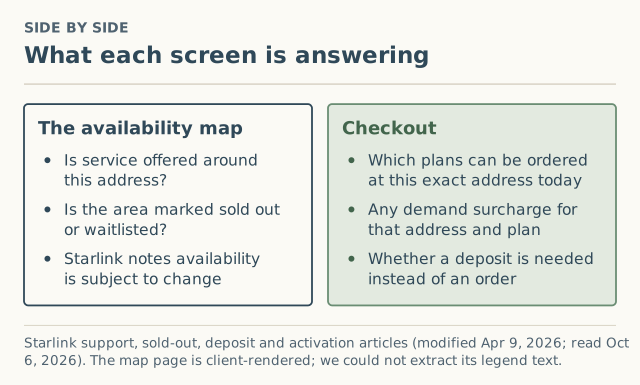
The map at Starlink’s availability map is where Starlink’s own articles send people to check availability and capacity. Its sold-out article describes regions that “show as ‘sold out’ on our availability map.” Its deposit article recommends the map “to review when the service will be available” and adds, “service availability is subject to change.”
Checkout is where an order is actually accepted. It’s where you choose a plan, where any demand surcharge appears, and where a deposit is offered instead of an order if Residential is full at your location.
One limit on our side: the map page is rendered in the browser, and we couldn’t extract its legend or labels as text when we checked it. So we describe it from Starlink’s help articles, not from the map’s own wording.
Why they can disagree
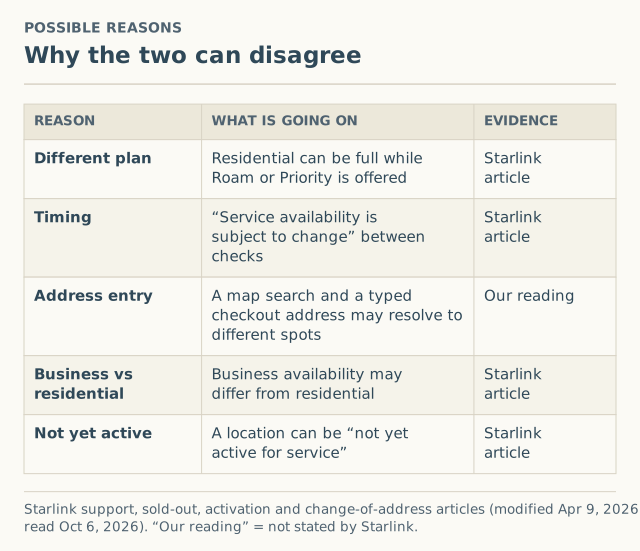
| Reason | What’s going on | Evidence |
|---|---|---|
| Different plan | Residential can be full while Roam or Priority is offered. Starlink: “Standard and Priority plans cannot be activated in capacity-limited areas… there will be an option to activate with a Roam service plan.” | Starlink article |
| Timing | Capacity changes. “Service availability is subject to change.” A map check last week and a checkout today aren’t the same moment. | Starlink article |
| Business vs residential | “Availability for business plans may differ from residential service.” | Starlink article |
| Not yet active | An address change can fail because “the requested location may be at capacity or not yet active for service.” | Starlink article |
| Address entry | A map search and a typed checkout address can resolve to slightly different spots, especially for rural addresses or new builds. | Our reading, not stated by Starlink |
“Available” for which plan?
This is the most common mismatch. A general “service is available here” doesn’t mean every plan is. If Residential is at capacity, Starlink’s articles describe checkout offering a deposit for Residential, or Roam (and Priority, for reactivations) instead. If your checkout only shows Roam, that’s the capacity-limited case, and Starlink says you “will be unable to switch from a Roam service plan to a Standard or Priority service plan until your area has available capacity.”
Sorting it out, step by step
- Re-check both on the same day. Map, then checkout, back to back. If the mismatch disappears, it was timing.
- Confirm the address. Make sure checkout has the exact service address where the dish will sit, the same one you searched on the map. For rural or new addresses, check that the location it resolves to is your property.
- Note which plans checkout offers. Residential with a deposit, Roam only, or nothing at all? Each points to a different cause (table above).
- Read the wording. “Sold out” or a deposit offer means Residential capacity. A failed address change that says the location is “not yet active” is different; see sold out vs waitlist vs not available.
- Decide. Deposit and wait, accept a plan that’s offered if it suits you, or use another provider. We don’t advise on plan choice.
- Write it down and report it. Date, plan, what checkout said, and your county. A sold-out checkout is notable right now, because Starlink says the US currently has no sold-out regions.
Worked example (hypothetical)
A household in a fast-growing exurb checks the map on a Sunday. It shows service at their address. On Wednesday they go to checkout and choose Residential. Checkout offers a deposit, not an order.
- Timing? They re-check the map Wednesday evening. If it now shows the area as sold out, capacity changed between Sunday and Wednesday. If it still shows service, keep going.
- Plan? They look at what else checkout offers. If Roam is offered, that fits Starlink’s description of a capacity-limited area for Residential.
- Address? They confirm the checkout address is the house, not a nearby road segment.
- Decision. They have DSL that works for now, so they place a deposit at their real address and keep DSL. When the 7-day email arrives, they’ll read checkout again, including any surcharge line.
What not to do
Don't buy a store kit to get around a sold-out checkout. Starlink says Standard and Priority plans cannot be activated in capacity-limited areas, and its sold-out article tells retail buyers to enter their service address on Starlink's order page “to ensure availability.”
- Don’t use a different address that the map likes better. Service “is only guaranteed at the service address listed on your account.” See why a friend’s address backfires.
- Don’t place a deposit at an address where the dish won’t live. The waitlist is per service location.
When it happens to existing owners
Mismatches aren’t only a new-buyer problem. Starlink’s articles describe two owner situations where the account flow can refuse what the map seems to allow:
- Changing your service address. If the change fails, Starlink says “the requested location may be at capacity or not yet active for service,” and suggests checking the map or switching to Roam if you need service outside your designated address.
- Resuming after Standby. “The ability to reactivate Residential service after cancelling or using Standby Mode is dependent on capacity in the area.” If there’s no Residential capacity, Roam or Priority is offered. Starlink currently says US customers can resume Residential “without delay.”
What to write down when they disagree
A mismatch is useful information if you record it well:
| Write down | Example |
|---|---|
| Date and time of each check | Map: Oct 4, evening. Checkout: Oct 6, morning |
| What the map showed | Service shown, no sold-out notice |
| What checkout offered | Deposit only for Residential; Roam orderable |
| Plan you tried | Residential |
| Your county | Not your address |
That’s exactly the information our report form asks for (choose “Sold out, at capacity, or a waitlist”). Dated reports like this are the only way to see whether mismatches cluster in particular counties or months.
Which to trust for what
| Question | Trust | Why |
|---|---|---|
| Can I place an order at my address today? | Checkout | It is the step that accepts or refuses the order |
| Is there a surcharge? | Checkout | The map doesn’t show it |
| Is my area generally covered? | The map, then checkout | The map is Starlink’s first-look tool |
| Has anything changed since last month? | Both, dated | Availability “is subject to change” |
| What did other people in my county see? | County reports, once published | Never your quote, but a sense of what’s normal |
What we don’t know
- Exactly what the map’s colors and labels mean today. It’s client-rendered, and Starlink’s help articles describe it only in general terms.
- How quickly the map updates after capacity changes. Starlink doesn’t say. That’s why checkout wins.
- How common map-checkout mismatches are. No public data exists. Our form records “sold out, at capacity, or a waitlist” as a checkout result by county and month, but as of October 5, 2026 we had 0 such reports.
Common mistakes
- Trusting a screenshot of the map from weeks ago. Availability changes.
- Assuming “available” means Residential. Check which plans checkout offers.
- Taking a deposit offer as an error. It’s Starlink’s documented process for a full area.
- Forgetting the surcharge. Even when checkout accepts an order, read it for a demand surcharge line.
What to do next
- Read how to read the availability map for what the map does and doesn’t show, and our short coverage guide.
- If checkout says sold out, see what “sold out” means and how the waitlist works.
- Report what checkout showed, with the month and plan. We ask for your county, never your address.
Questions people ask
Why does the Starlink map show available but I can't order?
Which is right, the map or checkout?
Checkout offers a deposit instead of an order. What does that mean?
Checkout only offers Roam at my address. Why?
Does Starlink have sold-out areas in the US now?
Sources
- Starlink support: My region is at capacity or shows as "sold out" on the availability map. What does that mean? (modified Apr 9, 2026) (retrieved Oct 6, 2026)
- Starlink support: How do I activate my Starlink? (modified Apr 9, 2026) (retrieved Oct 6, 2026)
- Starlink support: How do I change my service address? (modified Apr 9, 2026) (retrieved Oct 6, 2026)
- Starlink support: How do I reactivate service? (modified Apr 9, 2026) (retrieved Oct 6, 2026)
- Starlink support: Deposit/Pre-Order - Status and how to confirm my order when it's my turn (modified Apr 9, 2026) (retrieved Oct 6, 2026)
- Starlink availability map (retrieved Oct 6, 2026)
Related guides
Coverage
How to read the Starlink availability map, and what it leaves out
What Starlink's availability map tells you about your address, what it doesn't show (surcharge, local speeds, obstructions), and the order to check things in.
Sold out
What “sold out” means on Starlink: capacity, not stock
Starlink “sold out” or “at capacity in your area” means Residential is full at that location, not a hardware shortage. What it means, US status now, what to do.
Sold out
Sold out vs waitlist vs not available: three Starlink states
Starlink sold out, waitlist and not available mean different things. How to tell which one you're in, what each means, and the right next step for each.