Key takeaways
- Starlink has a waitlist for addresses where Residential is sold out. You join it by placing a deposit for your service location.
- Starlink gives no dates. An unconfirmed pre-order simply means you're still waiting.
- When it's your turn you get an email titled “Your Starlink is ready! Confirm your order in the next 7 days.” Miss the 7 days and the deposit is cancelled and fully refunded.
- As of Oct 6, 2026, Starlink says there are currently no sold-out regions in the US, so most US addresses can order without a waitlist.
- The pre-order shows in your account's billing tab, not under “Your Orders.”
On this page
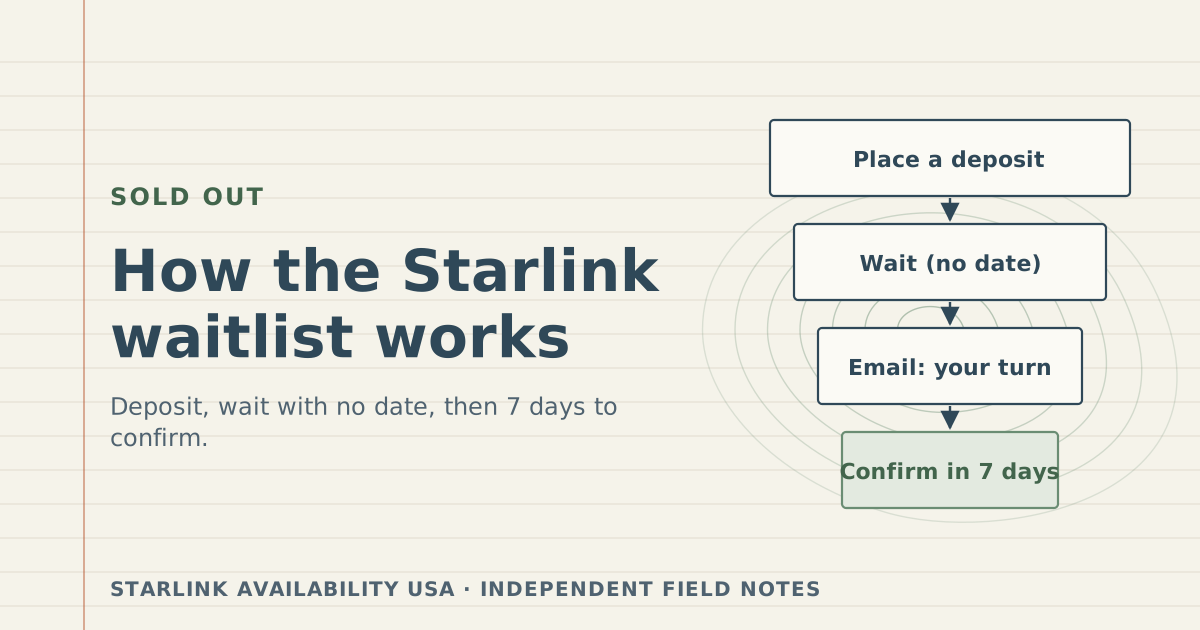
Yes, Starlink has a waitlist, but only for addresses where Residential service is sold out. You join it by placing a deposit for your service location; Starlink gives no date; and when capacity opens and you’re next in line, you get an email with 7 days to confirm your order. If you don’t confirm in time, Starlink cancels the deposit and refunds it in full.
Right now most US buyers won’t meet the waitlist at all. Starlink’s reactivation article says “there are currently no sold-out regions in the United States” (modified April 9, 2026; still the wording on October 6, 2026). The process below is what applies if that changes, or if your checkout offers a deposit instead of an order.
The waitlist, step by step
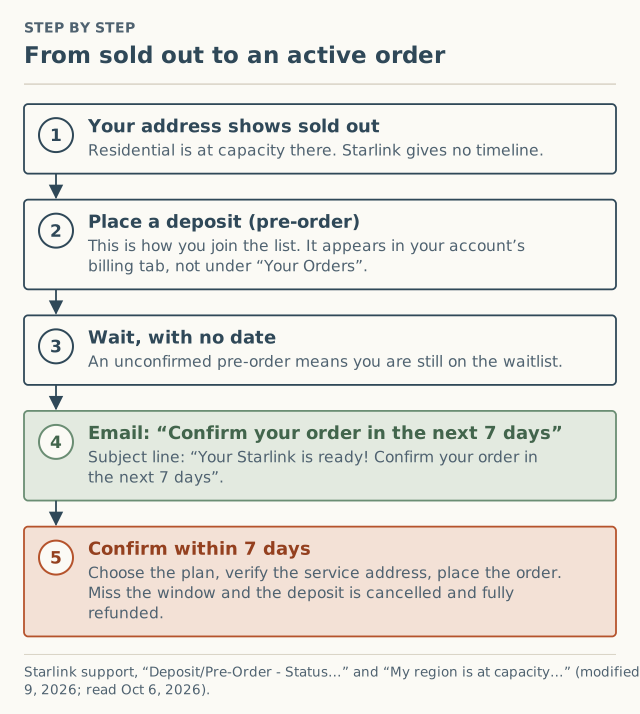
1. Your address shows sold out
Starlink’s sold-out article: if your region shows as sold out on the availability map, “residential service is at capacity and residential service activations are currently not possible.” It adds: “We are unable to provide timelines for residential service availability in any sold out regions.” What “sold out” really means is covered in capacity, not stock.
2. Place a deposit (pre-order)
“In order to get notified when service availability has capacity again, you must place a deposit for your desired service location.” If you already have an account, Starlink’s steps are: open Subscriptions, click Add Subscription, enter your service address, click Check Availability, and place a pre-order.
Starlink’s activation article also mentions that “if the area you’re trying to activate in is at capacity, you can place a deposit when placing an order.” The deposit amount isn’t in our data files, so we don’t quote one; checkout shows it.
3. Wait, with no date
From Starlink’s deposit article:
“If your pre-order is still not confirmed, it means you are still on the waitlist, and we are unable to provide service to your address at this time.”
“At this time, we do not have a specific date for when we are able to provide service to your address.”
Your pre-order is in the billing tab of your account. Starlink notes it “will not be listed under ‘Your Orders.’” People who look under orders often think the deposit vanished.
4. The email: your turn
When “it is available and you are next in line on the waitlist, you will receive an email indicating that your deposit will be converted to an order.” The subject line, per Starlink: “Your Starlink is ready! Confirm your order in the next 7 days.”
5. Confirm within 7 days
You have 7 days from that email to confirm. Starlink’s checkout steps after clicking “Confirm My Order”:
- Log in; select “Check Out Now” under the Deposits section.
- Confirm your service plan and verify your service address (the pencil icon).
- Add optional accessories and select “Add to Cart.”
- Check the shipping address and payment method.
- If you already own a kit, select “I Already Have My Starlink” and enter the Starlink identifier.
- Select “Place Order.” Starlink says this “will activate your service immediately and apply your deposit.”
“If you do not confirm your order within the allotted timeframe, your deposit will be automatically cancelled and fully refunded.”
Read checkout when your turn comes. Confirming is a checkout like any other, so look for a demand surcharge line before you place the order. Starlink sets that fee by service address and plan at the time. See how to check before you order.
Where you stand, and what to do
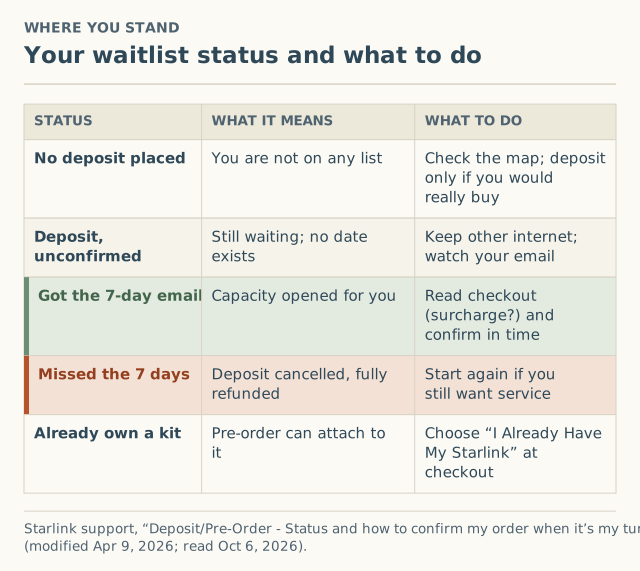
| Status | What it means | What to do |
|---|---|---|
| No deposit | You’re not on any list | Check the map. Deposit only if you’d actually buy at that address |
| Deposit, unconfirmed | Still waiting; Starlink has no date | Keep your current internet; make sure Starlink’s emails reach your inbox |
| Got the 7-day email | Capacity opened for you | Read checkout and confirm before the 7 days end |
| Missed the window | Deposit cancelled, fully refunded | Start again if you still want service |
| Already own a kit | The pre-order can attach to it | Choose “I Already Have My Starlink” at checkout |
How long is the wait?
Nobody outside Starlink can tell you, and Starlink says it can’t either. What exists is a dated press record of areas going onto and off the sold-out list, all unverified:
| Date (article) | What was reported |
|---|---|
| Nov 18, 2024 | Areas around Austin, Portland, Seattle, Sacramento and San Diego sold out, plus most of Puerto Rico (SatelliteInternet.com) |
| Feb 27, 2025 | Waitlist expands to sections of east Florida, east North Carolina and around Phoenix (SatelliteInternet.com) |
| Jan 27, 2026 | North Carolina, Oregon and Washington “no longer marked as sold out” (SatelliteInternet.com) |
| Feb 12, 2026 | A retailer’s blog, Basenor, claimed waitlists were removed globally (weak source; not confirmed by Starlink in what we read) |
| Apr 9, 2026 | Starlink: “there are currently no sold-out regions in the United States” |
So for parts of Washington and Oregon, the gap between the first press report of sold-out status and the report that it had lifted was about 14 months. That is the gap between two articles, not anyone’s measured wait. Individual places in line could have been reached much sooner or later. This is exactly the question our crowd record is meant to answer: when people report a sold-out result by month and county, the dataset can eventually show how long sold-out status lasts. As of October 5, 2026 we had 0 sold-out reports.
What to do while you wait
- Keep whatever internet works. With no date, cancelling your current service early is the biggest avoidable risk.
- Make sure the email reaches you. The 7-day window starts on the email date. Check spam filters for Starlink messages.
- Look up alternatives. The FCC National Broadband Map lists providers that report service at your location. See is Starlink available in my area?
- Don’t buy a store kit to jump the line. Starlink says Standard and Priority plans “cannot be activated in capacity-limited areas.” A kit can be offered Roam instead, and you can’t switch to Standard or Priority “until your area has available capacity.”
Edge cases
- Existing customers resuming service. Resuming Residential also depends on capacity. Starlink says Standby “does not reserve your spot on a Residential plan,” and that if there’s no Residential capacity, Roam or Priority is offered. In the US, it currently says customers can resume “without delay.”
- Business plans. “Availability for business plans may differ from residential service.”
- You moved while waiting. The deposit is for “your desired service location.” If the address changes, the old place in line was for the old address. Starlink’s article doesn’t describe transferring a pre-order to a new address.
- Hardware already on another line. Starlink: cancel the other service line, transfer the hardware, then use “I Already Have My Starlink.”
Before you place a deposit
- Is this the address where the dish will live? The deposit is “for your desired service location.”
- Would you buy if the email came tomorrow? If not, the deposit just holds money.
- Have you checked your sky? Starlink recommends the app’s obstruction check before ordering in heavily obstructed areas.
- Do you know what checkout will add? When your turn comes, read the summary for a demand surcharge before you confirm.
- Have you looked at alternatives? With no date, a backup matters more than the deposit.
Deposit vs order: what’s different
| Deposit (pre-order) | Order | |
|---|---|---|
| When it’s offered | Residential at capacity at your location | Capacity available |
| Where it shows in your account | Billing tab | Your orders |
| Activates service? | No | Starlink says placing the order “will activate your service immediately” |
| Has a deadline? | Only once you get the 7-day email | No |
| If you change your mind | Not confirming within 7 days cancels it with a full refund | Starlink’s 30-day return window applies to hardware |
Common mistakes
- Looking for the pre-order under “Your Orders.” It’s in the billing tab.
- Missing the 7-day email. The deposit is refunded, but you lose your turn.
- Placing the deposit at an address that isn’t where the dish will live. The waitlist is per location.
- Assuming confirmation means no surcharge. Read the checkout summary.
What to do next
- Check your address on Starlink’s map and at checkout. If it offers an order, you don’t need the waitlist.
- If it offers a deposit, compare your options in sold out vs waitlist vs not available.
- Follow the dated record on the sold-out and waitlist log.
- If checkout tells you an area is full, report it with the month and plan. We ask for your county only.
Questions people ask
Does Starlink still have a waitlist?
How long is the Starlink waitlist?
Is the Starlink deposit refundable?
Where do I find my Starlink pre-order?
What happens when it's my turn on the Starlink waitlist?
I already own a Starlink. Can I use it with my pre-order?
Sources
- Starlink support: Deposit/Pre-Order - Status and how to confirm my order when it's my turn (modified Apr 9, 2026) (retrieved Oct 6, 2026)
- Starlink support: My region is at capacity or shows as "sold out" on the availability map. What does that mean? (modified Apr 9, 2026) (retrieved Oct 6, 2026)
- Starlink support: How do I reactivate service? (modified Apr 9, 2026) (retrieved Oct 6, 2026)
- Starlink support: How do I activate my Starlink? (modified Apr 9, 2026) (retrieved Oct 6, 2026)
- Tennessee Dept. of Economic and Community Development: FCC Broadband Mapping Challenge (explains the FCC National Broadband Map) (retrieved Oct 6, 2026)
- SatelliteInternet.com: Starlink sold out, waitlist returns, Nov 18, 2024 (retrieved Oct 5, 2026)
- SatelliteInternet.com: Starlink congestion surcharge (sold-out status lifted in NC, OR, WA), Jan 27, 2026 (retrieved Oct 5, 2026)
- Basenor (retailer blog): Starlink eliminates global waitlists, Feb 12, 2026 (retrieved Oct 5, 2026)
Related guides
Sold out
What “sold out” means on Starlink: capacity, not stock
Starlink “sold out” or “at capacity in your area” means Residential is full at that location, not a hardware shortage. What it means, US status now, what to do.
Sold out
Sold out vs waitlist vs not available: three Starlink states
Starlink sold out, waitlist and not available mean different things. How to tell which one you're in, what each means, and the right next step for each.
Coverage
Is Starlink available in my area? A step-by-step check
Check if Starlink is available at your address in four steps: the map, checkout, a surcharge check and a sky check. What each answer means and what to do next.