Key takeaways
- Don't confirm yet. The quote is shown before you commit, and nothing obliges you to accept it on the spot.
- Starlink's surcharge article says that if this service line already paid a surcharge for this location, you can resume at the same address without paying again; if it never did, one may apply.
- Starlink's pausing FAQ, modified the same day (Apr 9, 2026), says no surcharge applies after Standby. Both still read that way on Oct 6, 2026.
- A different plan, a different address, or a new service line (such as a retail kit) are separate triggers that can explain a fee.
- If you think it's wrong, Starlink's article says to create a support ticket.
On this page
- The checklist: six things before you confirm
- Starlink’s two help pages disagree
- Worked example: two owners, same street
- What about capacity?
- What not to do
- What to put in a support ticket
- Fee-side facts to know before the next pause
- What we don’t know
- Common mistakes
- What to do next
- Questions people ask
- Sources
If your Starlink reactivation quote shows a demand surcharge you didn’t expect, don’t confirm yet. Check three things first: whether you’re resuming at the same service address where this line already paid a surcharge, whether you picked a different plan, and whether this is really the same service line. Starlink’s surcharge article says a line that already paid for its location can resume there without paying again, while a line that never paid there may be charged on resume.
The confusing part is that Starlink’s own help center contradicts itself. Its pausing article still says no surcharge applies after Standby. The checklist below works through the question either way, and ends with how to dispute a charge you believe is wrong.
The checklist: six things before you confirm
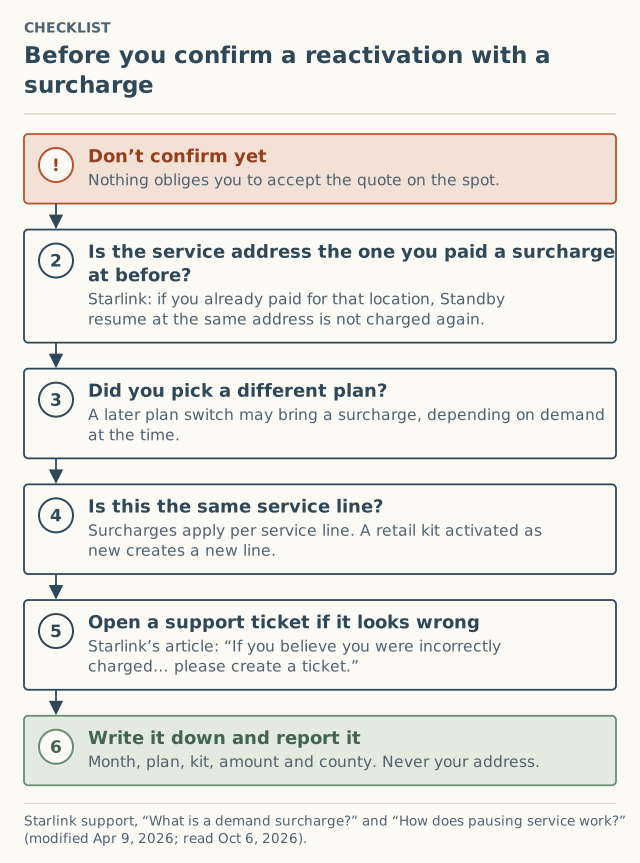
1. Don’t confirm yet
Starlink’s resume flow has you pick a plan and then confirm. The quote is in front of you before you do. Close it if you need time; nothing in Starlink’s articles says the option disappears.
2. Same address as where you paid before?
The surcharge article is specific: “If you already paid a demand surcharge for that specific location, you can pause service with Standby Mode and later resume high-speed service at the same address without paying the surcharge again.” The key words are that specific location. If the service address on the line has changed since you paid, or you never paid at this one, the protection doesn’t apply.
Look at the service address on the subscription before you resume. If you updated it while paused, you’re really in a move case; see changing your service address.
3. Same plan as before?
Starlink’s resume steps include “Select your desired service plan.” Choosing a different plan from the one you paused on can matter: “If you switch service plans later, a demand surcharge may be applied depending on availability and demand in your area at the time of the change.” Try the quote on your previous plan and compare.
4. Same service line?
Starlink applies the fee “per service line, not per account.” If you’re activating a different kit (a replacement bought at a store, say) rather than resuming the line you paused, that’s new service. Starlink: a retail kit “creates a new service line” and is “subject to the demand surcharge if your service address is in a high-demand area at the time of activation.” A Support replacement “typically avoids” this.
5. Open a ticket if it looks wrong
If you resumed at the same address, on the same line, where you paid before, and you’re still quoted a fee, that contradicts Starlink’s own article. Starlink: “If you believe you were incorrectly charged the demand surcharge, please create a ticket for further review.” Its pausing FAQ adds: “If you were charged a demand surcharge after switching to Standby Mode, please reach out to support for assistance.” Quote both.
6. Write it down and report it
Note the month, plan, kit type, amount and county. Not your address, and not a screenshot (it usually shows the address). Then add it to the record via the report form, choosing “Reactivating a dish.”
Starlink’s two help pages disagree
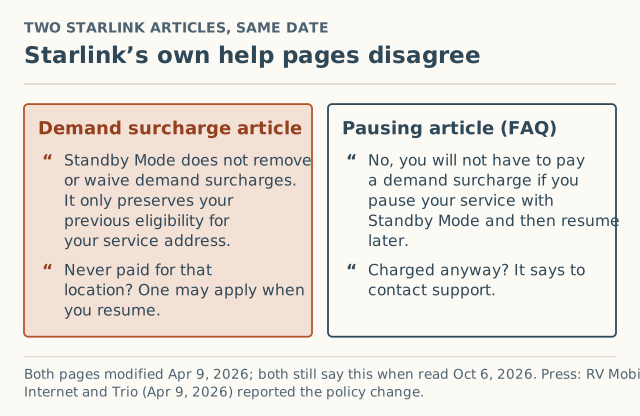
| Page | What it says | Modified |
|---|---|---|
| What is a demand surcharge? | “Standby Mode does not remove or waive demand surcharges. It only preserves your previous eligibility for your service address.” | Apr 9, 2026 |
| How does pausing service work? (FAQ) | “No, you will not have to pay a demand surcharge if you pause your service with Standby Mode and then resume later.” | Apr 9, 2026 |
Press outlets read this as a policy change. RV Mobile Internet reported on April 9, 2026 that “Standby Mode no longer waives a demand surcharge - instead, it only preserves prior eligibility.” A Trio Flat Mount blog post the same day described customers paying “$1,500 just to resume service they already had.” Both are press-layer reports, unverified.
The newer, more detailed rule is the surcharge article’s, and it’s the one most consistent with what press outlets reported. But if you’re charged on a resume where you did pay before, the pausing FAQ is worth citing in your ticket.
Worked example: two owners, same street
Amounts are hypothetical; Starlink publishes none.
| Owner A | Owner B | |
|---|---|---|
| First order | Paid a surcharge at this address | Ordered when the area wasn’t high-demand; paid nothing |
| Paused | Standby, same address | Standby, same address |
| Resume | Same plan | Same plan |
| What the surcharge article implies | No surcharge: already paid “for that specific location” | One “may apply,” depending on location and plans available at resume |
| What the pausing FAQ says | No surcharge | No surcharge |
Owner B is the case that surprises people. They did nothing wrong; the area simply became high-demand while they were paused, and under the surcharge article their line has no prior payment there to preserve. If you’re Owner A and see a fee anyway, that’s when a ticket is clearly warranted.
What about capacity?
Separate from the fee, resuming Residential depends on capacity. Starlink’s reactivation article says it’s “dependent on capacity in the area,” and also: “there are currently no sold-out regions in the United States, meaning US-based customers can resume Residential service without delay.” That was still the wording on October 6, 2026. The pausing article notes Standby “does not reserve your spot on a Residential plan,” and that if your area is at capacity you can “resume service immediately on any plan available in your area.”
What not to do
- Don’t change the service address to dodge it. A move into a high-demand area is its own trigger, and a false address risks the service itself. See why a friend’s address backfires.
- Don’t buy a new kit to start fresh. A new service line is evaluated as new service.
- Don’t switch plans just to get a different number unless you actually want that plan; a later switch back can be a trigger too.
What to put in a support ticket
A clear ticket gets a clearer answer. Include:
| Item | Example |
|---|---|
| Service line | The subscription you’re resuming |
| Service address status | Same address as when you last paid a surcharge, or changed while paused |
| Plan | Same plan as before, or a different one |
| When you paused | Month and year |
| Whether you paid a surcharge at this address before | Yes / no / not sure, with the month if yes |
| The quote | Amount and date seen |
| Starlink’s wording | The surcharge article’s “already paid… without paying the surcharge again,” or the pausing FAQ’s “you will not have to pay a demand surcharge” |
Keep it factual and quote Starlink’s own pages. Don’t include card or account numbers in places other than Starlink’s support system.
Fee-side facts to know before the next pause
Whether to pause is a separate decision we don’t advise on. These facts from Starlink’s pausing article affect the fee side:
- Standby is available on Roam, Residential and Priority plans, “excluding promotional offerings and select kit rentals,” and “is not available for V5 hardware.”
- Standby “does not reserve your spot on a Residential plan.”
- Pausing for “more than 12 consecutive months may, at Starlink’s discretion,” require a fee or plan change.
- In August 2025, pause was upgraded to Standby Mode; the old zero-data, no-cost pause “is no longer available.”
What we don’t know
- How often resumes carry a fee. The press layer has dated reports of $1,500 resumes; GadgetReview reported on July 16, 2026 that “Tiers run $100, $250, $500, $750, and $1,500” (unverified). We have no crowd reports yet: 0 received as of October 5, 2026. Reactivation is its own event type on our form, so county numbers will separate it from new orders once there are at least 5 reports.
- Which help page Starlink will fix. We’ll log the change, with the date, when one of them is updated.
- Whether Starlink records “paid for this location” for lines from before the April 2026 policy. Its articles don’t say.
Common mistakes
- Confirming in frustration. Read the quote and close it if you need to think.
- Assuming Standby equals protection. It preserves eligibility you already had at that address.
- Not checking which plan the resume flow pre-selected. Compare against your old plan.
- Disputing without quoting Starlink’s own words. Quote the article that supports your case.
What to do next
- Work through the six checks above, then decide: confirm, wait, or open a ticket.
- For the full trigger logic, see what triggers a demand surcharge. For moves, see changing your service address.
- The owner surcharge page keeps the dated record for reactivations, moves and plan switches.
- Report what you saw, $0 included. It helps the next owner know what’s normal in your county.
Questions people ask
Why is Starlink charging me a demand surcharge to reactivate?
Does Standby Mode protect me from the demand surcharge?
Can I dispute a Starlink reactivation surcharge?
Can I reactivate on a different plan to avoid the fee?
Are there sold-out areas in the US right now?
Should I pause or cancel instead next time?
Sources
- Starlink support: What is a demand surcharge? (modified Apr 9, 2026) (retrieved Oct 6, 2026)
- Starlink support: How does pausing service work? (modified Apr 9, 2026) (retrieved Oct 6, 2026)
- Starlink support: How do I reactivate service? (modified Apr 9, 2026) (retrieved Oct 6, 2026)
- Starlink support: Service Plan Changes (modified Jul 10, 2026) (retrieved Oct 6, 2026)
- RV Mobile Internet: Starlink changes demand surcharge policy for Standby Mode and service address moves, Apr 9, 2026 (retrieved Oct 5, 2026)
- Trio Flat Mount (blog): Starlink changed its Standby Mode policy and existing customers are paying for it, Apr 9, 2026 (retrieved Oct 5, 2026)
- GadgetReview: Starlink is billing customers $1,500 just to stay connected, Jul 16, 2026 (retrieved Oct 5, 2026)
Related guides
Owners
How to change your Starlink service address after a move
Step-by-step: change your Starlink service address on desktop or in the app, what to check first, why it can fail, and when a move brings a demand surcharge.
Surcharges
What triggers a Starlink demand surcharge? One flowchart
The four events that trigger a Starlink demand surcharge, the one condition behind all of them, and the edge cases: moves, Standby, plan switches.
Owners
Why using a friend's address to dodge a Starlink fee backfires
Using a friend's address to avoid a Starlink demand surcharge risks your service and often brings the fee back. What Starlink's rules say, and better options.